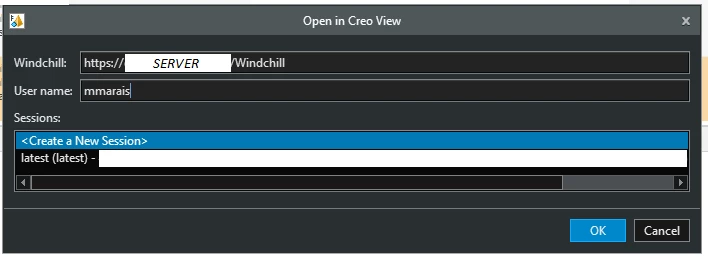
Where are wcparams documentation? How can I create a permanent creoview:// link?
Version: Windchill 12.0
Goal: Append permanent CreoView links to an Excel file so that a user can bypass needing to open windchill to view a windchill item listed in an excel table.
Description:
I wrote this VBA script to retrieve a creoView link:
Function getCreoViewLink(PN As String) As String
 Dim Value As Variant
 Dim response As Object
 Dim CreoViewRepresentations As Object
 Dim creoViewLink As String

 On Error Resume Next
 ' get response from helper function
 ' Get Response from Endpoint: https://" & server & ":443/Windchill/servlet/odata/v4/CADDocumentMgmt/CADDocuments?$select=Representations&$filter=Number eq '" & partNumber & "'&$count=false&$expand=Representations
 Set response = GetCADDocumentData(PN, CONST_PTC_SERVER_DOMAIN, CONST_UNAME, CONST_PASS)

 ' navigate Json to "CreoViewURL"
 Set CreoViewRepresentations = JsonConverter.ParseJson(response.responseText)("value")(1)("Representations") ' (1)("CreoViewURL")

 ' Exit early if cannot API request failed, return empty string
 If Err.Number <> 0 Then
 Err.Clear
 getCreoViewLink = ""
 Exit Function
 End If
 On Error GoTo 0

 ' Find the latest Representation
 For Each Representation In CreoViewRepresentations
 If UCase(Representation("CreoViewURL")("Label")) = "LATEST" Then
 creoViewLink = Representation("CreoViewURL")("URL")
 Exit For 'Exit early once found
 End If
 Next Representation

 ' Return CreoView link
 getCreoViewLink = creoViewLink
End Function
The links returned are similar to this:
'creoview://?wcparams=eyJhdHRyaWJ1dGVzIjp7InVybGJhc2UiOiJodHRwczovL1NFUlZFUi9XaW5kY2hpbGwiLCJzZXNzaW9uaWQiOiJhMUpYZG1kTzc1ZFE0RUpRREZnd1Q1OXEwSU0uYjBiOTkiLCJ1c2VyaWQiOiJtbWFyYWlzIn0sImlkIjoiY3YifQ==`
After doing a Base64 Decode on the link I find the actual arguments being passed to creoview:
`creoview://?wcparams={"attributes":{"urlbase":"https://SERVER/Windchill","sessionid":"a1JXdmdO75dQ4EJQDFgwT59q0IM.b0b99","userid":"mmarais"},"id":"cv"}`
Printed pretty:
{
 "attributes":
 {
 "urlbase":"https://SERVER/Windchill",
 "sessionid":"a1JXdmdO75dQ4EJQDFgwT59q0IM.b0b99",
 "userid":"mmarais"
 },

 "id":"cv"
}
Session IDs appear to be a 1 time use thing, they expire immediately after use and I get this error if I try to use the link a 2nd time:
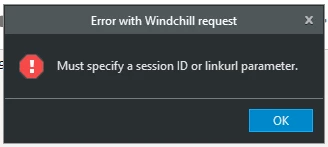
How can I get the linkurl parameter? Currently from the Base64 Decoding it seems I'm passing a session ID argument...
I also would like to automate opening and merging a bunch of links at once, are there any parameters to bypass this window? Such as to merge a bunch of creoViews into a single session or to open them all separately.