
4-Participant
December 5, 2022
Solved

How to Change Footer Icon in ThingWorx Navigate

  • December 5, 2022
  • 1 reply
  • 2218 views

How to Change Footer Icon in ThingWorx Navigate , Please find the attachment , I have higlighted in right botton in the image

Best answer by ThorstenMueller

To my knowledge you can only change this image if you make a copy of the LandingPageAccessAppMashup and change the master of the copied landing page.
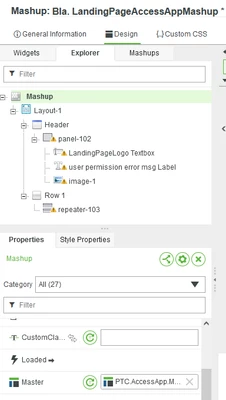
ThorstenMueller_0-1670235065108.png

You can make a copy/dublicate of the original master "PTC.AccessApp.Master" and change this master to your wishes.
Insert the newly copied and modified mastermashup into copied LandingPage Mashup master.
Then bookmark the copied LandingPageMashup instead of the PTC OOTB mashup.

1 reply

24-Ruby III
December 5, 2022
4-Participant
December 5, 2022

Thanks for the reply, I need to change Image in this Mashup PTC.AccessApp.PTCWhiteLogoNavigate how to when clicked edit but no Image change option available


13-Aquamarine
December 5, 2022

To my knowledge you can only change this image if you make a copy of the LandingPageAccessAppMashup and change the master of the copied landing page.

ThorstenMueller_0-1670235065108.png

You can make a copy/dublicate of the original master "PTC.AccessApp.Master" and change this master to your wishes.
Insert the newly copied and modified mastermashup into copied LandingPage Mashup master.
Then bookmark the copied LandingPageMashup instead of the PTC OOTB mashup.