Hi all
When granting a license to a user (TWX/Navigate is version 8.5), here are the notes I made to myself:
- Search for 'navigate_view_named_group'. After 'nav' you can just select it from suggestions
- click on 'manage members'
- click on 'edit'
- choose a user or group of users, move the icon to the box at the right
- click on 'save'
To see how many licenses are in use, at the top left choose browse

Towards the bottom, select Subsystems:
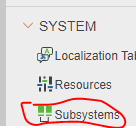
In the list of subsystems, choose 'LicensingSubsystem'
Click on 'services'
Click on 'GetCurrentLicenseInfo'
Click on 'Execute' (careful: click in the wrong place and 'Execute' disappears, then you need to Cancel to get back)
I want to paste a picture for that, but this post has got too long now.
Now you can see how many licenses you have, how many are in use, expiration dates ...
cheers -- Rick

