

Learn How Role Based Apps Can Help Connect More People to PTC Windchill
For those of you who were unable to join us on Thursday, March 10th, for the webcast, “PLM Access for All Stakeholders”, the recording is now available here. Watch Chris Bergquist, PTC PLM Solution Manager, demonstrate PTC Windchill 11’s new role-based apps and hear what questions were top of mind for your colleagues.
With role-based apps, stakeholders across all parts of the product’s lifecycle can easily and securely access product data at their point of need.
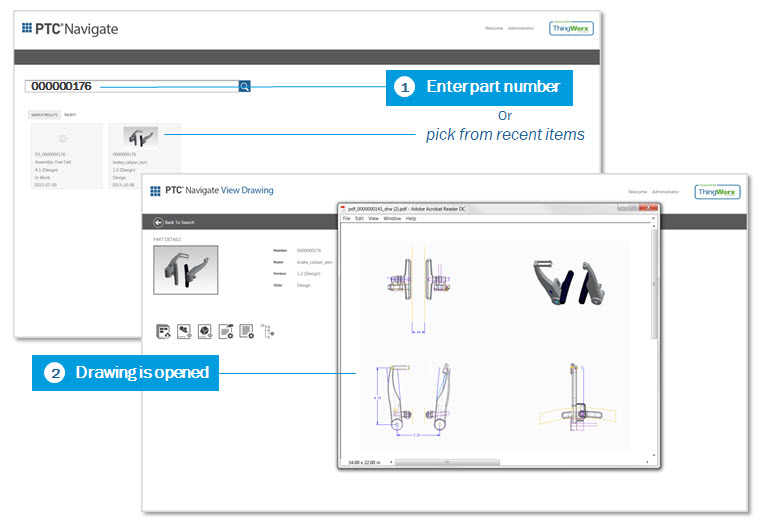
For instance, with the View Drawing app you can enter a part number and quickly bring up a drawing for that part. This allows you to easily get to the critical information that's communicated from design to manufacturing in one step.
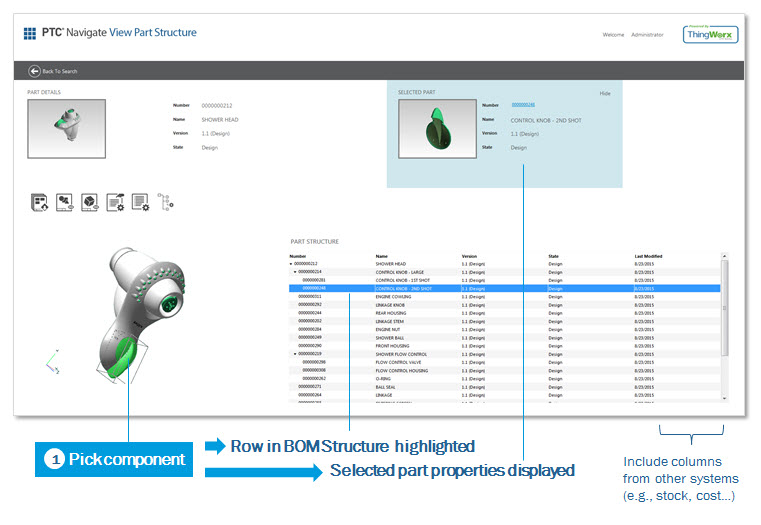
With the View Part Structure app you can enter a part number for an assembly and get a 3-D image of that assembly coupled with the part structure that describes that assembly. Highlighting a row in the part structure will simultaneously highlight the appropriate elements in the 3D assembly. This is a fantastic way to quickly understand the status of a part number and how the parts fit together in the design. This can be critical information for those in the role of procurement, tooling, process planning and sourcing.
These are just a couple of examples of how role-based apps can extend the value of PLM throughout your organization. Watch the webcast to learn how you can use role-based apps to:
- View documents
- View part properties
- View parts list
- View design files
- View and measure in 3D
Existing PTC Windchill customers should note that you can take advantage of these apps immediately. There's no need to upgrade your existing Windchill deployment. So you can dramatically expand the value of PLM information across the roles in your company with no barriers.