
1-Visitor
June 12, 2020
Solved

Navigate_author_named_group

  • June 12, 2020
  • 2 replies
  • 27582 views

Hi,

I have 10 licenses ptc_navigate_author_named. But the problem is that I can't use any license
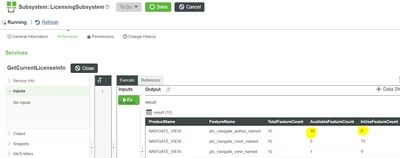
 

ListLicenses.PNG


If I see the User Groups, I have not a group "navigate_author_named_group. This group should be created automatically from LicensingSubSystem, is it right ?.
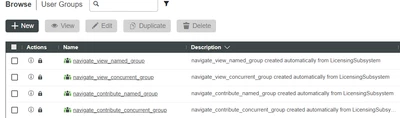
 

UsersGroups.PNG


Can someone help me, please?

I am a newcomer to "Thingworx Composer."


Version: ThingWorx 8.5.1-b90 "


Thanks you


Best answer by CarlosDoRamirez

I found the solution.

You had to put the file "license_capability_response.bin" in the folder "ThingworxPlatform" of the Thingworx Navigate server.

Then restart the PTC*** services.


The file "license_capability_response.bin" is obtained in the "Manage lisenses" option in https://www.ptc.com/en/support.


A big thank you for the support.

2 replies

16-Pearl
June 15, 2020

The 4 license groups you see are the only licenses groups created in Navigate. Other licenses such as the author or adk licenses are paired with the view_named licenses, so the first n number of users assigned to the ptc_navigate_view_named group, where n is the number of author licenses, receive the functionality provided by those author licenses.

1-Visitor
June 15, 2020
Thank you very much for the reply.

But, there is something that is not yet logical in the Composer configuration.

I have bought 12 licenses "ptc_navegated_author", 10 licenses "ptc_navigate_contrib_named" and
4 licenses "ptc_navigate_view_named". In total 26 licenses that should be used with Composer (Navigate). 
However, I can only assign 20 licenses to users. Is there any synchronization that I should do between Composer and AD? or between Composer and Windchill?
Summary:

Thank you very much for the response and patience with me.

SummaryProblems.PNG


16-Pearl
June 18, 2020

I am researching the details of how the licensing works, but I think that licenses you have in Windchill will not show up in Navigate.

Community Manager
June 24, 2020

Hi @CarlosDoRamirez.


If you feel your question has been answered, please mark the appropriate response as the Accepted Solution for the benefit of others with the same question.


Thank you for participating in our community!


Regards.


--Sharon