Best answer by pshashipreetham

Hi,


The configuration of the JSON needs to be made to show all the Tasks or the Problem Report Tasks. 

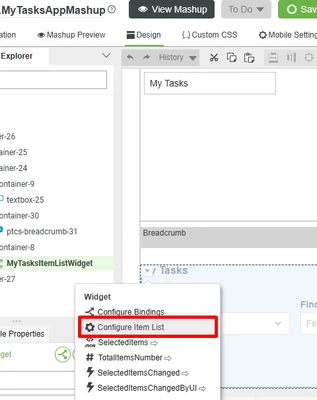
  1. Press on the Configure Item List:
    pshashipreetham_0-1732467394699.png
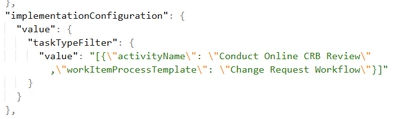
  2. Then, change the JSON as  per the Template and the activity name:
    pshashipreetham_3-1732467511825.png

Thanks,

3 replies

16-Pearl
November 6, 2024

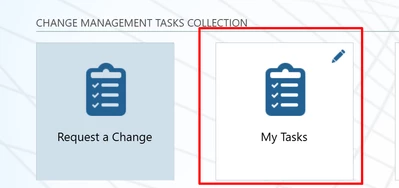
My Tasks is not currently capable of showing the Problem Report Tasks. My Tasks allows the user to see a list of change request review tasks that are assigned to them. The user can select a task to see more information about it and perform the following actions: Approve, Reject, Analyze, and Reassign.


The choice of the name My Tasks for this tile is more of an optimistic plan for the future than an accurate reflection of its current capabilities.

12-Amethyst
November 19, 2024

Hi @pshashipreetham ,

It appears that this post may answer your question.  For the benefit of other Community Members who may have the same question, it would be great if you could designate it as the Accepted Solution.

In the event that this response did not answer your question, please post your current status so that we can continue to support.

Thanks for using the PTC Community!

Regards,
Abhi

pshashipreetham18-OpalAuthorAnswer
18-Opal
November 24, 2024

Hi,


The configuration of the JSON needs to be made to show all the Tasks or the Problem Report Tasks. 

  1. Press on the Configure Item List:
    pshashipreetham_0-1732467394699.png
  2. Then, change the JSON as  per the Template and the activity name:
    pshashipreetham_3-1732467511825.png

Thanks,