1-Visitor
April 29, 2024
Solved

{0:@D} added to annotation

  • April 29, 2024
  • 3 replies
  • 3096 views

When dimensioning a threaded hole Creo is adding {0:@D} to the front of the dimension. I have tried to delete this several times without results, creating a new dimension for the same hole does not help the problem

Does anyone know why this is appearing and how to stop it from automatically adding
Best answer by pausob

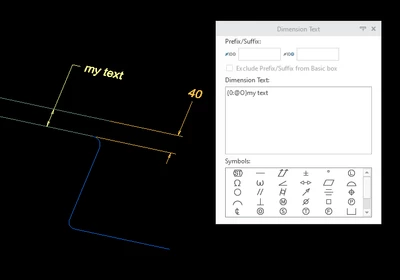
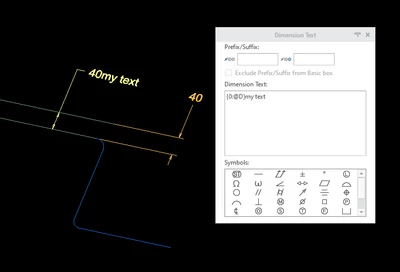
You will have to change the @D to an @O (the letter O, as in Override) to suppress the display of the dimension value.

pausob_0-1714421515473.png

-->

pausob_1-1714421548275.png


Note that only works for annotation dimension.  Driving dimensions cannot be "overriden".

3 replies

kdirth
21-Topaz I
21-Topaz I
April 29, 2024

"{0:***}" typically signifies that the enclosed text has a different format that the default for the note.


What version of Creo are you using?  Can you add a screen shot of the dimension and dimension text?

There is always more to learn.
1-Visitor
April 29, 2024

Creo 10.0

LM_10646089_0-1714414942554.png


Dale_Rosema
23-Emerald III
23-Emerald III
April 29, 2024

If you add a space between the right bracket } and the 4X, I think the .201 will go away.

kdirth
21-Topaz I
21-Topaz I
April 29, 2024

After trying a few things in Creo 7, I think the issue is no space after the dimension.


The @D refers to the dimension.  When you don't leave a space you are trying to append a character to the end of the @D.  To maintain the dimension, Creo is adding the brackets to separate the @D from the added text.


If you copy all of the added text, deleted it and select off the dimension, you can go back in, add a space and paste the text back.  If you don't want a space, you are stuck with the formatting brackets.

There is always more to learn.
Community Moderator
May 13, 2024

Hi @LM_10646089,


I wanted to follow up with you on your post to see if your question has been answered. 
If so, please mark the appropriate reply as the Accepted Solution. 
Of course, if you have more to share on your issue, please let the Community know so that we can continue to help you. 


Thanks,
Anurag