

16-Pearl
December 29, 2015
Question

180-deg twist in sweep

  • December 29, 2015
  • 23 replies
  • 9155 views

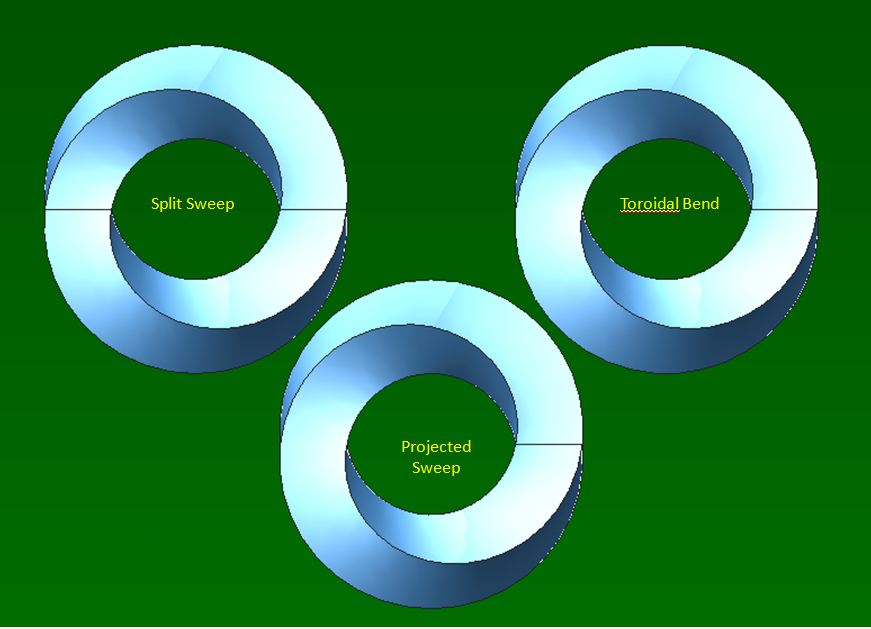
Hi, all. I just realized there is a problem in Creo in handling 180 rotation while sweeping along a circular section. I was trying to create a Mobius with 180-deg twist but the sweep feature failed miserably. After many attempts, I managed to model out the geometry through a few different ways:

1. Toroidal bend.

The sweep is done through a straight line before bending it to 360-deg by Toroidal bend.

2. Split sweep.

Sweep is performed twice, along  half circle each time.

3.  Projected sweep

The single trajectory is extracted from a helical sweep created prior to it.

I am sure many of you have come across the similar problem before. I am attaching my proe file here with the hope that I can learn your workarounds  too. Many thanks in advanced for your sharing.
mobius.JPG


This thread is inactive and closed by the PTC Community Management Team. If you would like to provide a reply and re-open this thread, please notify the moderator and reference the thread. You may also use "Start a topic" button to ask a new question. Please be sure to include what version of the PTC product you are using so another community member knowledgeable about your version may be able to assist.

23 replies

BHOoi16-PearlAuthor
16-Pearl
December 30, 2015

As I explore more into this 18-deg twist, I found that the sweep feature will fail as long as the trajectory is a closed contour. For irregular contours, other than circular, Toroidal Bend can't be used to create the twist geometry. Only method 2 & 3 mentioned above are capable, as shown in the examples below:

pendant4.jpg

Anyone has any explanation on why 180-deg twist fails on the closed contours ? Any different workarounds ? Appreciate you can share your thoughts. Thanks again.

17-Peridot
January 3, 2016

You highlighted the answer yourself in the first line of your second post.

It can be done with sweep and once you figure it out, you will feel completely dumb


BHOoi16-PearlAuthor
16-Pearl
January 4, 2016

I did ask in another forum but got no reply.

1-Visitor
January 3, 2016

I used a rotational blend ( found under the shapes group)

I needed to follow a few simple rules

1. the rotational blend must have a common axis of rotation for all of the sketches

2. all sketches must have the same number of vertices

3. the rotation for all of the sketches must not exceed 120 deg. between sketches

you can pre-define the sketches ( external to the blend) or define the sketches on the fly (internal to the blend)

under the options tab you can specify if the blend is to be a closed loop

look at the attached file  I took your file and created a fourth option for you to decide on

BHOoi16-PearlAuthor
16-Pearl
January 4, 2016

Thanks, Leif Nelson. This could be another to model the geometry. We probably need to fine tune it a little to get more uniform twist.

17-Peridot
January 4, 2016

Just to provide a feature reference...

BHOoi16-PearlAuthor
16-Pearl
January 5, 2016

I just hope PTC will fix this "bug" one day, or even next release so that whatever tricks we have will become redundant.

1-Visitor
January 5, 2016

Have you tried increasing your model accuracy?

BHOoi16-PearlAuthor
16-Pearl
January 6, 2016

Steps of method 3....Capture.JPG

17-Peridot
January 6, 2016

I might have found a simpler way to generate that trajectory, but this accomplishes the -original- goal.

Method 3 is something completely different! 

Patriot_1776
22-Sapphire II
January 6, 2016

Definitely simpler, but the above works......for one turn......... 

Glad to see people dig into it and figure things out themselves.  Bravo!