
10-Marble
June 14, 2024
Solved

Adding a Dimension to an Existing Ordinate Dimension

  • June 14, 2024
  • 2 replies
  • 3833 views

Is it possible to add a dimension reference to an existing ordinate dimension?


In the image below, the top hole is a new feature. I want to add it to the existing ordinate dimensions, but can't figure out how without deleting everything and starting over.
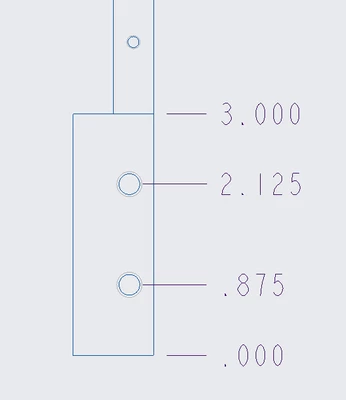

 

GL_9723777_0-1718383079600.png


Best answer by StephenW

This may vary a little based on what version you are using but most likely.

in the annotate tab, select Ordinate Dimension, if you look on the message log, it tells you  "Select an entity to create a new baseline or select an existing baseline ordinate dimension to use it or middle-click to cancel."

If you pick an existing ordinate baseline (aka .000, in your case), you should be able to added ordinate dimensions.

2 replies

StephenW23-Emerald IIIAnswer
23-Emerald III
June 14, 2024

This may vary a little based on what version you are using but most likely.

in the annotate tab, select Ordinate Dimension, if you look on the message log, it tells you  "Select an entity to create a new baseline or select an existing baseline ordinate dimension to use it or middle-click to cancel."

If you pick an existing ordinate baseline (aka .000, in your case), you should be able to added ordinate dimensions.

10-Marble
June 14, 2024

Yes, you are correct, not sure how I missed it. Thanks.

23-Emerald III
June 14, 2024

haha, Creo is notoriously non-intuitive!  But it grows on you.

I learn new tricks constantly as I review the community.

4-Participant
April 21, 2025

You need to add to configuration editor with : creat_drawing _dims_only , value "no" when adding new ordinate dimension to current ordinate dimension on drawing mode.

__PRESENT