1-Visitor
October 24, 2022
Solved

adding different materials to parts of a model

  • October 24, 2022
  • 2 replies
  • 1716 views

Web capture_24-10-2022_152022_www.youtube.com.jpeg


I want to add Copper material to the cylinder and aluminium for the box below. But when I do, the same material gets applied to the entire object.

please help!!!

Best answer by MartinHanak

@MU_10243770 wrote:

Web capture_24-10-2022_152022_www.youtube.com.jpeg


I want to add Copper material to the cylinder and aluminium for the box below. But when I do, the same material gets applied to the entire object.

please help!!!


Hi,

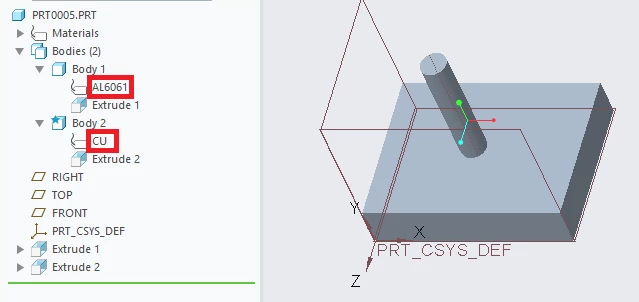
I think the requested functionality is available starting from Creo 7.0. You can create two bodies and assign different material to each body.

MartinHanak_0-1666607813711.png


2 replies

24-Ruby III
October 24, 2022

@MU_10243770 wrote:

Web capture_24-10-2022_152022_www.youtube.com.jpeg


I want to add Copper material to the cylinder and aluminium for the box below. But when I do, the same material gets applied to the entire object.

please help!!!


Hi,

I think the requested functionality is available starting from Creo 7.0. You can create two bodies and assign different material to each body.

MartinHanak_0-1666607813711.png


23-Emerald III
October 24, 2022

You will need to model it as 2 separate bodies in your part file as Martin shows. This can only be done in Creo 7 or newer.

If on an older version of Creo, you will need to model them as 2 separate part files and then assembly them together in an assembly file.