
14-Alexandrite
August 13, 2025
Solved

Additional options within round feature

  • August 13, 2025
  • 3 replies
  • 1162 views

It will be very helpfull to have ability to influence by check-box additional functionality in roun feature:

- add side influence
- piece to piece

(like we already have in boundary blend feature)


for example it is like this at the moment:
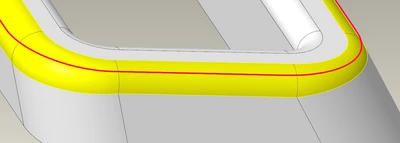
rsobecki_0-1755072233352.png

but when both as suggested properties will be possible to get the result should be like this:
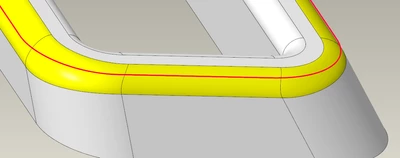
rsobecki_1-1755072565082.png


Best answer by tbraxton

Ideas for enhancements or changes to Creo should be submitted here:

https://community.ptc.com/t5/Creo-Parametric-Ideas/idb-p/creoparametric 


3 replies

tbraxton
22-Sapphire II
tbraxton22-Sapphire IIAnswer
22-Sapphire II
August 13, 2025

Ideas for enhancements or changes to Creo should be submitted here:

https://community.ptc.com/t5/Creo-Parametric-Ideas/idb-p/creoparametric 


Patriot_1776
22-Sapphire II
August 13, 2025

You can use C2 rounds, or conic rounds, I can't see needing more than that realistically.  If you want to get REALLY fancy, put 2 curves on the part and do a Boundary Blend for ultimate control.

5-Regular Member
August 15, 2025

Chordal rounds can help get this desired result, but can also result in non-tangencies, especially on parts with complex geometry. I've used a combination of chordal rounds and either boundary blends or style surfaces to get the desired result.

rsobecki14-AlexandriteAuthor
14-Alexandrite
August 18, 2025