12-Amethyst
May 30, 2024
Solved

Assemble Cabling Connectors with Hardware Automatically

  • May 30, 2024
  • 1 reply
  • 1477 views

In cabling/schematics, we can show our pins in our BOM by referencing the connector port parameters, but is there any way to automatically bring other parts into our harness models or drawings, like wedgelocks, wire seals, etc.


Thanks!


I'm on Creo 9
 

Best answer by Lars_F

The only thing we have used is a connector as an assembly...


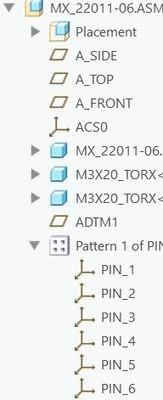
So if you have identical extra mechanical stuff that is needed with each connector... you can create the connector as an assembly. e.g. here is a connector with two torx screws...

connector_as_asm.jpg

The original connector is within the assembly with two added screws.

I thing you have to copy the entryports from the connector to the assembly root... (pattern of pins below)


entryports_at_root_level.jpg


This method works only for identical subassemblies. If the location of the screws is different for each setup then this won't work... or you have to copy each assembly with a new name...


Lars

1 reply

14-Alexandrite
June 3, 2024

Hello,


At least one way to add a part (any part) to the harness is to use the "Insert Component"-option.


insert_any_component.jpg

With this command you can attach a component coordinate System to harness (network point). Default orientation is along z-axis. 


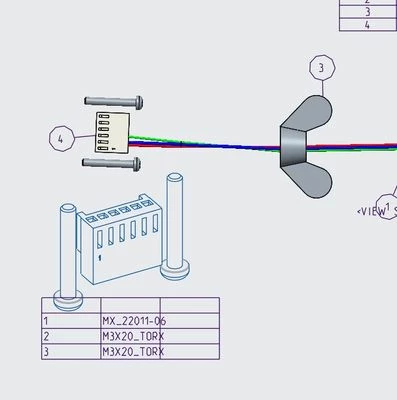
Here is an example of a wingnut added to a harness.


add_wignut.jpg


The wingnut shows up in our drawing table (asm.mbr.name shown with green highlight).


harness_flat_drawing.jpg


Best Regards,

Lars


12-Amethyst
June 4, 2024

Thanks a ton for the help!  Do you know if there's a way to automate this when bringing connectors from an EID?  We have connectors with 12 plus ports and it's a hassle to manually bring in the wire seals for each port.

Lars_F14-AlexandriteAnswer
14-Alexandrite
June 5, 2024

The only thing we have used is a connector as an assembly...


So if you have identical extra mechanical stuff that is needed with each connector... you can create the connector as an assembly. e.g. here is a connector with two torx screws...

connector_as_asm.jpg

The original connector is within the assembly with two added screws.

I thing you have to copy the entryports from the connector to the assembly root... (pattern of pins below)


entryports_at_root_level.jpg


This method works only for identical subassemblies. If the location of the screws is different for each setup then this won't work... or you have to copy each assembly with a new name...


Lars