

1-Visitor
March 13, 2017
Solved

axis pattern

  • March 13, 2017
  • 2 replies
  • 7308 views

Hi,

i am using the pattern tool, using axis to definate it. I would like to know if there is a way to make an axis pattern with two axis : i need a 17.39° x-rotation and a 51.13° y-rotation.


I thought in doing firstly the x rotation pattern and use the result to do de y rotation pattern. But i will have to delete de semi acabate pattern which will delete the second one as it is son o the first one. Am i understandable ?


Thank you,

Léo
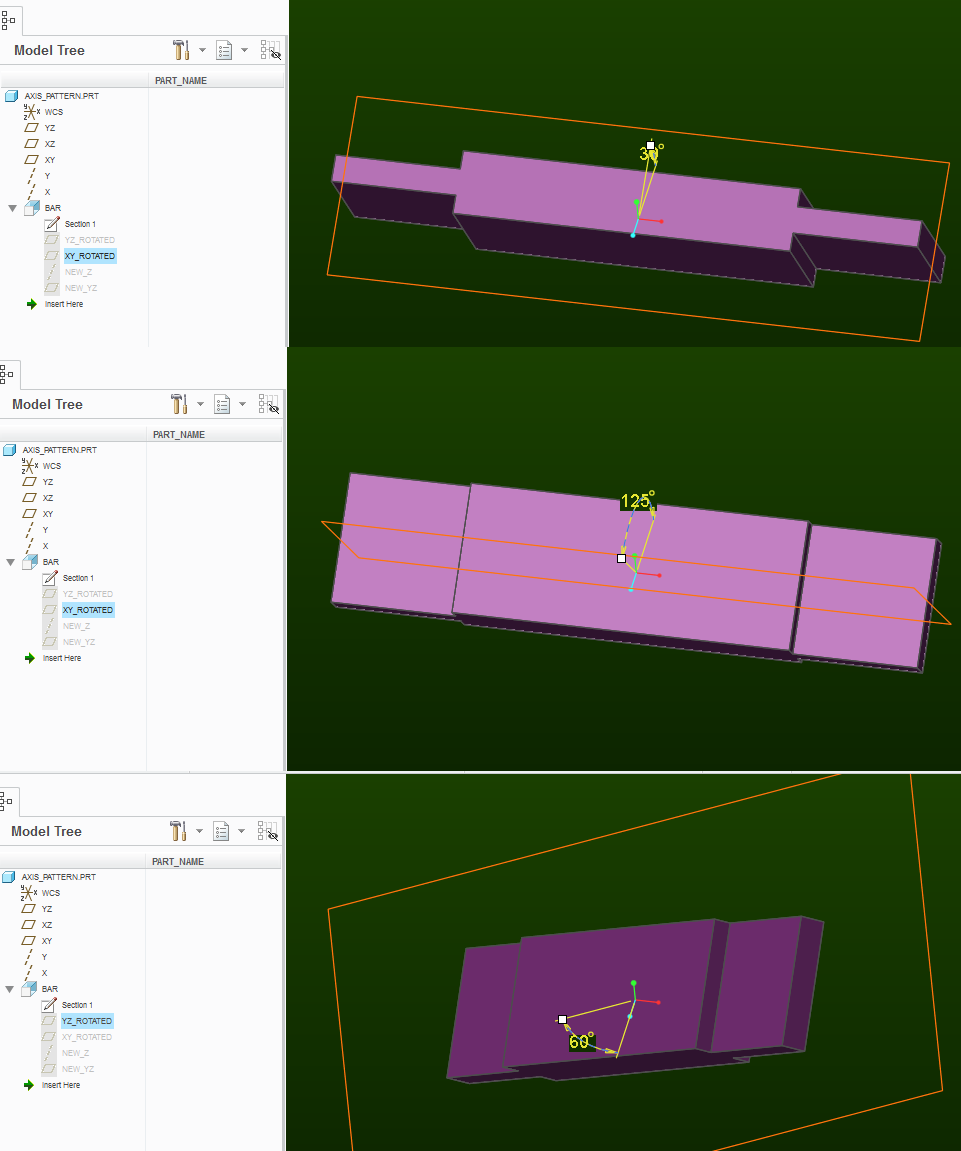
Best answer by psobejko

Essentially, the feature "BAR" is made by extruding a sketch made on the plane "XY_ROTATED".

The "XY_ROTATED" plane is defined as going through axis "X" and at an angle to plane "XY".

For your 2nd pattern instance, this angle will be 17degrees.

The plane "YZ_ROTATED" is defined by going through axis "Y" and at an angle to plane "YZ"

The angle of "YZ_ROTATED" plane is the other control angle - in your case 51degrees.

To be able to orient the sketch, I made plane "NEW_YZ" - defined as going through the axis "NEW_Z" and perpendicular to plane "XY_ROTATED".

The axis "NEW_Z" is the intersection of planes "XY_ROTATED" and "YZ_ROTATED".

Notice that if the "XY_ROTATED" plane is at 0 angle, then "NEW_YZ" is coincident with the plane "YZ_ROTATED".

Can you open the file I attached?  Then "edit" the two planes to see it in action:

axis_pattern_feat_editing.png

2 replies

1-Visitor
March 13, 2017

If you have a dimension within the feature for rotation about one of the axes, then, create an axis pattern about the other axis.  Within the axis pattern you can click on the dimension tab, click within direction one, select the dimension for rotation about the other axis and type in the increment.

2_axis.jpg

lsicsic1-VisitorAuthor
1-Visitor
March 13, 2017

i tried as you told me dut i have not beem succesful... Could you detail more step by step your explanation ?

In order to better explain my problem my piece is this one 1.png

And i need both rotations : 2.png3.png

1-Visitor
March 13, 2017

I'm sorry, I can't understand at all.

Can you sketch a picture?

This is what I guessed you are after:

angle_pattern.png

each spike is incrementally re-oriented by simultaneous 17.39° x-rotation and 51.13° y-rotation (about the default coordinate system)

(creo 3.0 example attached)

1-Visitor
March 13, 2017

The previous pattern behaves funny after about 180 degree mark.  This one is better:

angle_pattern2.png

lsicsic1-VisitorAuthor
1-Visitor
March 14, 2017

This is not exactly what i'm searching for.

Look, i did the piece like i want it :

tot.png

But i did it "manually", i would like to know how to create the second element with the pattern tool. The first element is that one i showed you in my second message.
The second element is like the first one but with a x-rotation and a y-rotation.

thank you for your disponibility,

Léo