2-Explorer
August 9, 2019
Question

Balloon Note Orientation

  • August 9, 2019
  • 2 replies
  • 3486 views

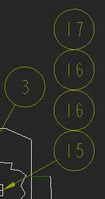
I have a string of Balloons that are attached vertically.  Is there a way I can orient them horizontally without starting over?
8-9-2019 9-04-43 AM.jpg


Thanks

2 replies

KenFarley
21-Topaz II
August 9, 2019

Select them and move them. They will "slide" around the diameter of the balloon they are attached to (i.e. in your picture, if you select the 16 balloon it will revolve around the 15 one).

doneill2-ExplorerAuthor
2-Explorer
August 9, 2019

It just moves both balloons...  


KenFarley
21-Topaz II
August 9, 2019

You select the balloon, "hover" over it until the movement or four-way arrow cursor shows up, then just "drag" the balloon(s) around the "parent" balloon. It also drags around any "child" balloons. See the below where I reposition the "3" balloon to the bottom of the "2" balloon. This is how things work for me in Creo 4 (and have since Creo 2 or maybe before that).BaloonMove.jpg

23-Emerald III
August 13, 2019

It depends on the type of balloon you are refering to. If it's a repeat region bom balloon (like Ken Farley is showing), you can drag the balloons around.

If it is a balloon note, I only remember being able to create these as horizontal or vertical and not being able to change them afterwards. 

doneill2-ExplorerAuthor
2-Explorer
August 13, 2019

Thank you... yeah... It's a Balloon Note... I was wearing it out trying to drag that balloon around!   :  )

I appreciate everyone's help!
