10-Marble
September 6, 2021
Question

Bend a straight, swept and mirrored part

  • September 6, 2021
  • 3 replies
  • 1965 views

This lever is currently straight, but I want to bend it so it resembles the right sideview.
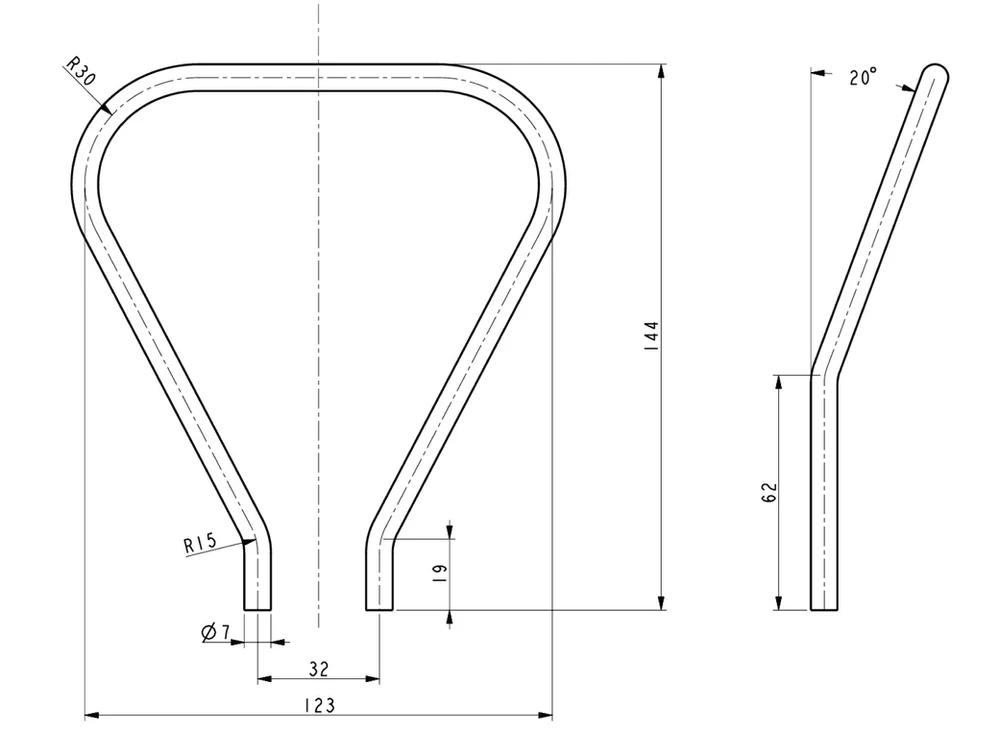
Skärmbild 2021-09-06 020230.png

3 replies

15-Moonstone
September 6, 2021

Search for tutorials on YouTube or look in Help about Spinal Bend. It's quite simple for this one. Make a sketch that is the bended profile. Use that sketch in the Spinal Bend feature.


Spinal bend.png

tbraxton
22-Sapphire II
22-Sapphire II
September 6, 2021

@magnus.salomons has explained one method to bend your existing flat geometry.


I have posted an example of an alternative modeling approach. In this example, the sweep trajectory for the round bar is created using two datum curves taken from your reference drawing dimensions. The intersection of these curves yields the 3D trajectory for a sweep creating the solid part.


I use spinal bend but it would not be my first choice to create this particular geometry. A Creo 4 part is enclosed for reference.


tbraxton_1-1630941506312.png


Patriot_1776
22-Sapphire II
September 9, 2021

Actually, projecting a true arc on an inclined plane like that will yield an ellipse in those bends.  In this case, if he didn't need the "flat pattern", I wouldn't use the spinal bend (one of my fave tools), I'd instead wrap a curve onto a surface mimicking the angled trajectory and simply use that as the trajectory.  This way the radii are true arcs.

10-Marble
September 6, 2021

Thanks for the replies, it's fixed now!
