
1-Visitor
December 28, 2020
Question

Best way to creating the same extrudes

  • December 28, 2020
  • 1 reply
  • 5237 views

Hi,

I'm creating a simple model in which there's a couple of the same cut extrudes, as follows:
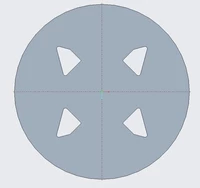
creo1.png


Now, I've achieved this by creating one extrude, creating rounds on it, mirrorring this extrude, and mirroring the extrude and the mirror of the first extrude which is... a little complex design intent and makes a model tree hard to read.
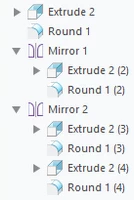
creo2.png


This is horribly unreadable if you ask me... I'd love to make a Pattern from extrude, but by using Axis Pattern I got something like this:
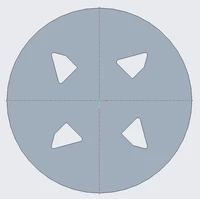
creo3.png


...which is huge different than part in the first image. 

I thought about creating all mirrors inside sketch and then extruding (cuting) all 4 shapes in one operation (Extrude) but I'd really like to make it with Pattern if possible.

What do you think? What is the best way and most healthy practice to achieve this?
Thank you in advance for all answers!

1 reply

tbraxton
22-Sapphire II
22-Sapphire II
December 28, 2020

The trick here is to use a datum plane to control the clocking angle of the extrude. You can then group the datum and extrusion and use axis pattern. I have enclosed a sample model (Creo 4) that has the orientation of all extrusions pointing at the central axis using an axial pattern.


Query the sketch of the pattern leader (Extrude 2) and you will see that datum 4 is used as a sketch orientation reference which will control direction of your extrude.


Use of clocking reference to orient extrusion in patternUse of clocking reference to orient extrusion in pattern

cadbart1-VisitorAuthor
1-Visitor
December 28, 2020

tbraxton, thank you for your answer and files! Your way works great with symmetric shapes but when you try to make it for my shape you'll see result shown on my post's second image and I'd like to get result shown on the first image. Besides, (I'm sorry I forgot mention it in origin post), the distance between the shapes horizontally and vertically is different... So we cannot use the axial pattern. 

The thing is I don't need to use a pattern to do it - I'd just like to make it as good as possible. I'm searching for the best way and healthy practice so that the model tree and design intent will be clear.

Do you have some idea?

KenFarley
21-Topaz II
December 28, 2020

When I have to make some complex features that I don't want to have mirrored in the sketch, I will build the portion of the part (a quarter of it, for you) with those features, then mirror the whole part to get all the mirrors I need. I hate the inflexibility of mirrored features, plus the complexity of the model tree as you mentioned.

For your situation, I might make a rectangular block with the initial cut through, mirror that for two, and mirror again for the final set of cut through features. Then I'd cut the outer shape of the thing based upon one or more of the through cuts. But, that's my recipe, and there are a lot of other cooks in the kitchen.

I don't see an easy way to use a pattern, unless there's some way to do a rotation of the feature as it is patterned, a sort of two-dimensional pattern...