14-Alexandrite
July 15, 2023
Solved

Blend not working where Boundary Blend is

  • July 15, 2023
  • 2 replies
  • 3519 views

I am trying to create a 3d "shelled" object by blending the outer edges together to form the shape and then blending the inner edges to remove material.
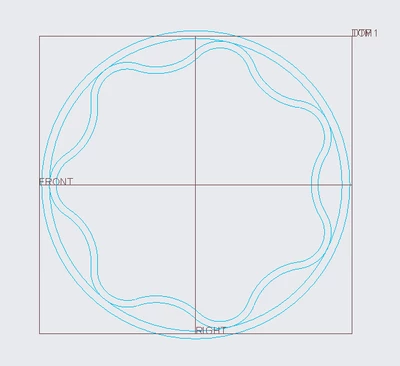
IbrahimTayyab_0-1689401240381.png

I am trying to create a blend using the references below however it fails to generate.
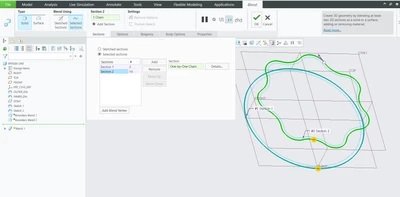
IbrahimTayyab_1-1689401353916.png

Using the same references boundary blend seems to work just fine, I am not sure why this is so.
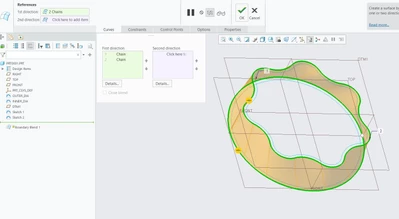
IbrahimTayyab_2-1689401427425.png

I tried using a circle to circle blend and it worked fine and the wavy to wavy blend worked fine as well.
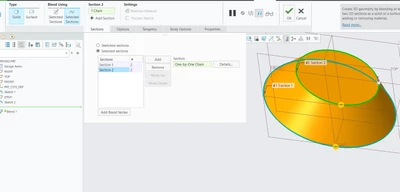
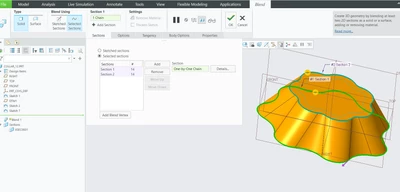
IbrahimTayyab_3-1689401855881.pngIbrahimTayyab_4-1689401885494.png


I have no idea what the problem here is.


By the way would this be called a shelled object or hollowed object or what would be the appropriate term?

I am using creo parametric 9.0 student version

Best answer by tbraxton

For swept blends note the following restrictions:

For a closed trajectory profile, one section must be located at the start point and at least one other section at another location.
Section references at the chain start and end points of the trajectory are dynamic and update if the trajectory is trimmed.
Section locations can be referenced to model geometry, a curve for example, but modifying the trajectory may invalidate the references. In this case the swept blend feature will fail.
All sections must contain the same number of entities.
 

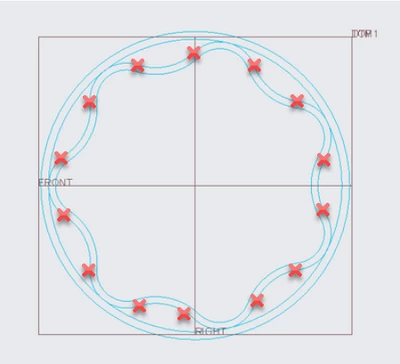
It is not working due to the requirement of each sketch in a blend must have an equal number of entities in the sketch. One entity (arc) exists between each set of 2 x. Your wavy sketch has more entities than the circle sketch. The red x shows the entities in the sketch. You can rectify this by dividing the circle into the same number of arcs and matching the blend vertices.


tbraxton_0-1689432319050.png


2 replies

14-Alexandrite
July 15, 2023

I was able to make the part using boundary blend however I am just interested in wanting to know why blend was not working.

IbrahimTayyab_0-1689402558197.png


tbraxton
22-Sapphire II
tbraxton22-Sapphire IIAnswer
22-Sapphire II
July 15, 2023

For swept blends note the following restrictions:

For a closed trajectory profile, one section must be located at the start point and at least one other section at another location.
Section references at the chain start and end points of the trajectory are dynamic and update if the trajectory is trimmed.
Section locations can be referenced to model geometry, a curve for example, but modifying the trajectory may invalidate the references. In this case the swept blend feature will fail.
All sections must contain the same number of entities.
 

It is not working due to the requirement of each sketch in a blend must have an equal number of entities in the sketch. One entity (arc) exists between each set of 2 x. Your wavy sketch has more entities than the circle sketch. The red x shows the entities in the sketch. You can rectify this by dividing the circle into the same number of arcs and matching the blend vertices.


tbraxton_0-1689432319050.png


14-Alexandrite
July 15, 2023

Thank you very much for the easy to understand explanation and thank you for taking the time out of your day. 👍

14-Alexandrite
July 21, 2023

Came across a video explaining how to do what tbraxton explained, might be helpful for anyone struggling with it.

https://www.youtube.com/watch?v=gJy9AMgnwd4