
1-Visitor
December 1, 2011
Question

Blending something hard

  • December 1, 2011
  • 4 replies
  • 2043 views

Can anyone give me a hand working out how to blend the yellow geometry in this model so that it is perpendicular to the underlying surface, creating a smooth variable draft?

My original plan was to sweep a circle along the edge of teh yellow geometry, then intersect that with the lower surface creating a curve on that surface, and then sweep or blend to that curve, but the surface I get is no good as I want to apply a rad that's only slightly short of the depth of the joining surface.

Can anyone think of anything clever?

Thanks
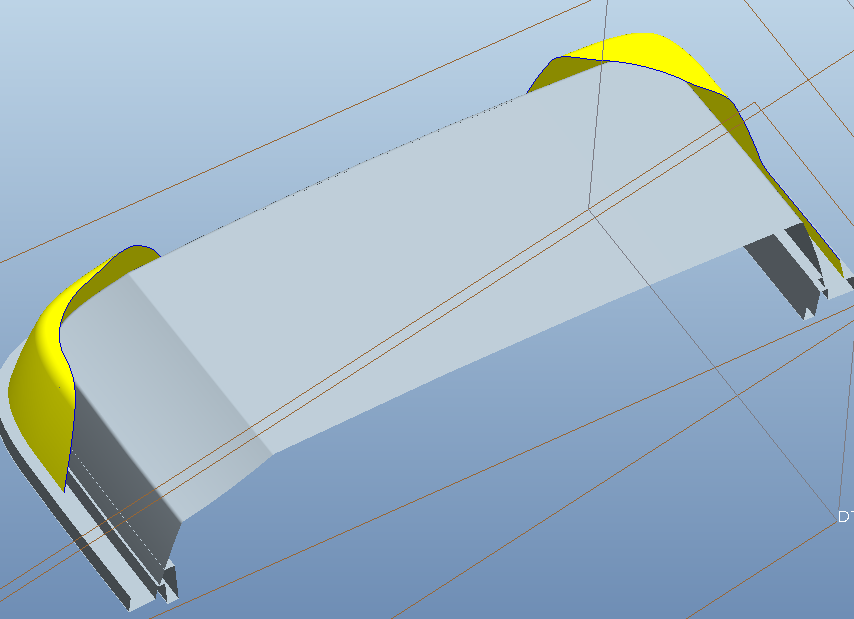
Capture.PNG


This thread is inactive and closed by the PTC Community Management Team. If you would like to provide a reply and re-open this thread, please notify the moderator and reference the thread. You may also use "Start a topic" button to ask a new question. Please be sure to include what version of the PTC product you are using so another community member knowledgeable about your version may be able to assist.

4 replies

13-Aquamarine
December 1, 2011

Hi David...

I can't quite visualize what you're asking. Could you show the surface created from the intersection curve? Even though that surface is no good, it would help illustrate what you're trying to achieve. I have some ideas but I can't be sure I totally understand what you're trying to create.

thanks!

-Brian

David_M1-VisitorAuthor
1-Visitor
December 2, 2011

Hi Brian

Here we go:

Capture.PNG

It's close to what I want, but what I'm aiming for is a smooth and mouldable transition from the yellow surface..

Update: What I've done since posting is effectively patch the intersect curve with datum curves to replace the jagged transitions.

Capture.PNG

This works well but I would be interested in hearing alternative techniques. For example, it seems that Extend has all the inteligence to do this (but not the parameters to extend at say, 80 degrees), or perhaps something involving Draft or one of the advanced blend features.

Thanks

13-Aquamarine
December 2, 2011

Hi David...

I'm sure I can do this with a blend to tangent surfaces. I can even incorporate the radius and possibly a draft, too if you want it. The problem is that I can't come up with a decent example to work with. I have something similar to yours but its tough to get the same shape. Do you have a dumbed down version of your part you can attach so I can try it?

It might be easier using your actual geometry than continuing the attempt to make my own.

thanks!

-Brian