

Oguzalp
4-Participant
May 7, 2026
Question

BOM – Split SIZE column into L, W, H with rounding — how?

  • May 7, 2026
  • 6 replies
  • 174 views

Hi everyone,
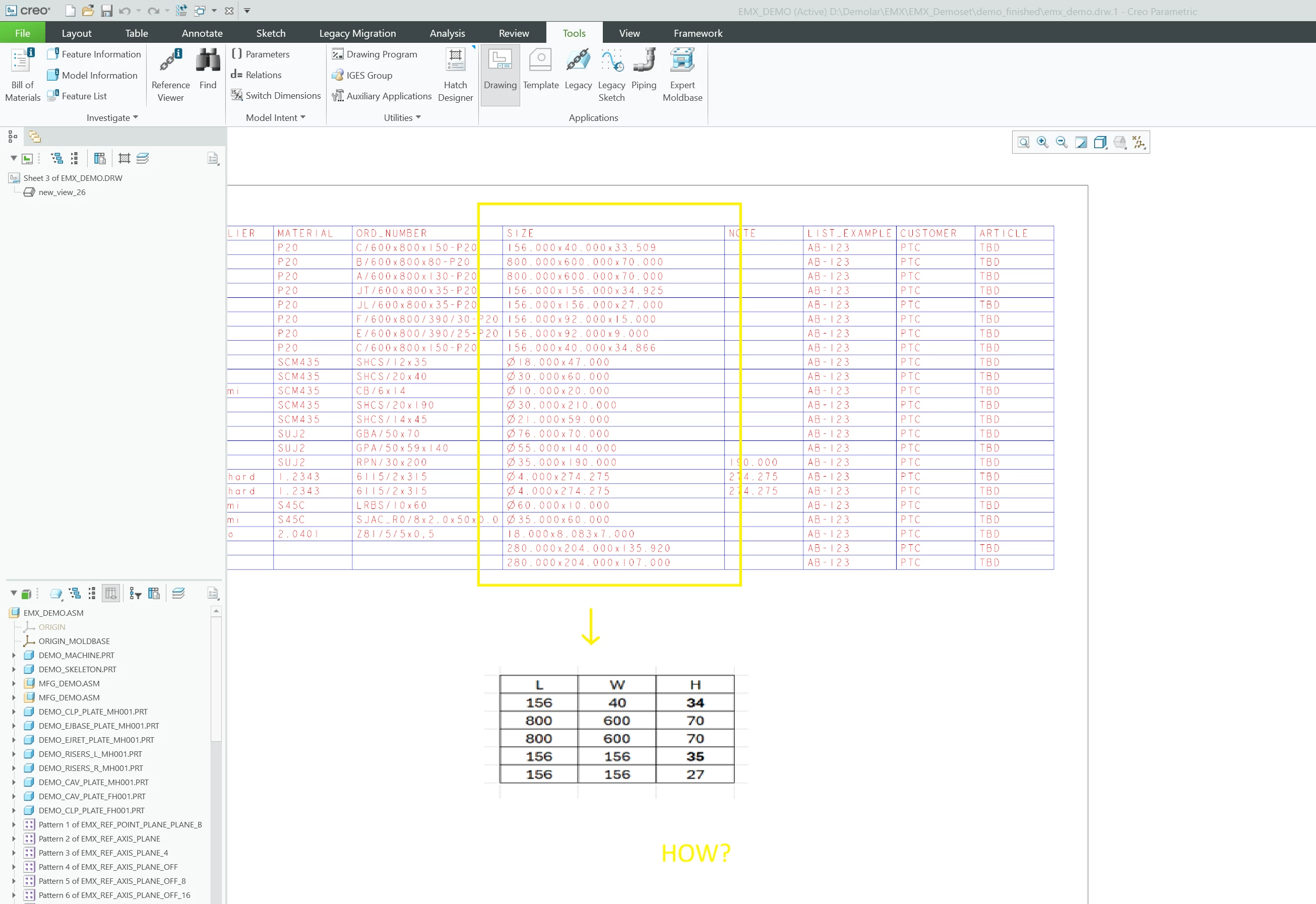
In our drawing BOM, the SIZE column shows values like 156.000x40.000x33.509 as a single string. I'd like to split this into three separate columns (L, W, H) showing only whole numbers, with standard rounding (anything above .5 rounds up).
Current output in the SIZE column:

156.000x40.000x33.509
800.000x600.000x70.000
156.000x156.000x34.925

Desired output across three columns:
L W H
156 40 34

800 600 70

156 156 35


A few things I'm unsure about:

Is there a way to do this directly in the Creo drawing repeat region table, using column format or symbolic parameters?
Can relations or parameters (e.g. user-defined SIZE_L, SIZE_W, SIZE_H) be used to parse and round the SIZE string, and then called in the BOM table?

Any advice on the best practice for this in Creo Parametric would be appreciated. Thanks!
 

6 replies

kdirth
21-Topaz I
May 7, 2026

What is the repeat region text for the column?  Table > Repeat Region > Switch Syms to show it.

EXAMPLE


There is always more to learn.
Oguzalp
Oguzalp4-ParticipantAuthor
4-Participant
May 7, 2026

asm.mbr.SIZE

kdirth
21-Topaz I
May 7, 2026

Is the parameter SIZE made from 3 different parameters?


Can you provide a sample part?

There is always more to learn.
17-Peridot
May 7, 2026

Looks like it is a single parameter being reported.

These need to be separate parameters to compose that parameter or report separately in drawing tables.

dave

23-Emerald III
May 11, 2026

You could possibly separate the L W H by scanning the SIZE parameter for the X between the values and create the three parameters you want for your table.

Catalina
Community Moderator
May 14, 2026

Hi ​@Oguzalp 


I wanted to see if you got the help you needed,


If so, please mark the appropriate reply as the Accepted Solution or please feel free to detail in a reply what has helped you and mark it as the Accepted Solution. It will help other members who may have the same question.

Please note that industry experts also review the replies and may eventually accept one of them as solution on your behalf.


Of course, if you have more to share on your issue, please pursue the conversation.


Best regards,

Catalina

PTC Community Moderator

Catalina | PTC Community Moderator
Oguzalp
Oguzalp4-ParticipantAuthor
4-Participant
May 20, 2026

My problem actually wasn't fixed. In assemblies containing dozens or hundreds of parts, it can be a bit of a waste of time to manually get the L, D, W values for each individual part. Also, these values can also be obtained via Model > Surfaces > Enclosure Volume > Properties > [x] Create box parameters.

KenFarley
21-Topaz II
May 20, 2026

Surfaces->Enclosure Volume is a grayed out option for me. I wonder what licenses one needs to be using to allow that to provide information. As such, I don’t really know what the results of such an inquiriy would be. Is that how your SIZE parameter is being defined?

If you want to run something for a large number of parts/assemblies there are methods of doing so. Something like defining new parameters might be very possible. I’ve done such things to process hundreds of drawings to produce DXF files in the past. I usually use a large trail file, others have used Creo batch.

KenFarley
21-Topaz II
May 15, 2026

You seem to be in a situation where you’re kind of doing things backwards from what would be the simpler process. You’ve got a long string parameter that is probably manually typed in. Now you want to extract the numbers in there to get three values. My preference for this would have been to have three real number parameters that specify the L, W, and H values. I would then use relations to build a string that specifies your SIZE parameter.

To deal with the data format you currently have, a single string, you need to parse that string and pull out the numbers. If you just wanted string parameters for L, W, and H this would be pretty straightforward, using the EXTRACT function. Assuming of course that disciplined entry of the SIZE parameter has been done, and the delimiters are ALWAYS “x”, not any other character, that someone hasn’t made a typo and used “,” instead of “.” for the decimal point, etc. Extra spaces, tabs, or other “white space” can also be problematic.

So, assuming you’re sure the SIZE parameters are all properly formatted, the method I would use to get the L, W, and H values you want:

  1. Extract the strings from the SIZE parameter that are textual representations of the dimensions of interest, using three new parameters, maybe txtL, txtW, txtH. I’d use a copy of the SIZE, txtWorking. Find the position of the first “x”, EXTRACT from the beginning of the txtWorking string to the position before the “x” for L, set the txtWorking to the portion of it that follows the “x”, then repeat to extract W, etc.
  2. Now you have three text strings that are your W, L, and H so you need to parse them to get the real number values. If there were a STRING to REAL function this would be relatively simple, but there isn’t one.
    Here’s a previous discussion where I had a go at doing this kind of thing.
    https://community.ptc.com/3d-part-assembly-design-327/bom-table-relations-convert-string-to-number-ston-98540
    It’s going to be a lot of repetitive lines of code.
  3. You’ll need to process the digits before the decimal point for the integer portion of the numeric value, then do the same for the digits after the decimal for the fractional portion.
  4. Once you have a real number for each value, use whatever kind of rounding you wish to get your final integer values for the table.

Regrettably, you are going to have to do this in every model being used in the assembly. You can copy the relations into each model, but still, you are going to have to open each one, etc.

Bear in mind all this is just what I’ve come up with at the moment, you’ll most likely find additional challenges as you attempt to implement things. I’d definitely make myself a test part and try out all the possible data situations you could encounter (what if there’s no decimal point? Is “0.0” handled correctly?)

You’ll probably wish you had originally specified that L, W, and H be input by the part creator, rather than a string.

17-Peridot
May 17, 2026

Good suggestions on the break into separate parameters.


You could use Nitro-BOM to extract the composite parameter to Excel … break it into separate values and have Nitro-BOM create the parameters in each model as an import using the ALL_PARAMS report….  This is trivial… the FREE license can do this.

you can get it here:

https://simplifiedlogic.com/nitro-bom/

Note - this requires JLINK to be installed with Creo Parametric.


Another option would be CREOSON - this would also work just fine… some nice examples of using Claude AI recently highlighted that are pretty slick also.


https://creoson.com/

Hope this helps.

Dave