
1-Visitor
March 11, 2026
Solved

Boolean operation: source model positioning

  • March 11, 2026
  • 1 reply
  • 168 views
I am using Creo Parametric Release 11.0 and Datecode11.0.6.0

I have a part 1 (single body .prt) in which I cut the volume of a part 2 (single body .prt) through a boolean operation.
After having modified the part 2, I updated the part 1: the part 2 positionning into part 1 was modified, the part 2 is turned upside-down into part 1.
How to (re)define the positionning of part 2 relatively to part 1?
    Best answer by tbraxton

     As an observation I would use a skeleton model or other top-down design tool to control this design intent between the parts and not component operations if possible. Without access to your design data and full understanding of design intent it is hard to recommend a good practice.


    It looks like Creo is flipping the surface normal reference on an assembly constraint. This could be due to the fact that the part is not fully constrained in the assembly locating these parts. If it is not fully constrained, try fixing that as a first step.


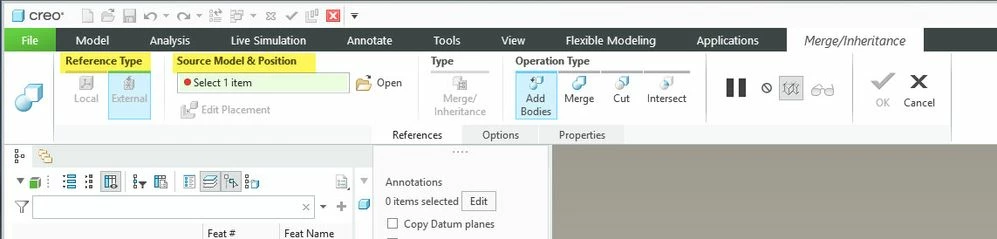
    Based on the screenshots, you are working in assembly mode and using the merge cut out Boolean component operation. You can control the placement using the options shown in yellow below.


    Part relative position controlPart relative position control

    1 reply

    22-Sapphire II
    March 11, 2026

    You need to provide more detail on how you are applying the Boolean operation, are you doing this in part mode or assembly mode? How are the parts constrained relative to each other? Is the Boolean operation done using multibody feature or through the use of the component operations in assembly mode?


    If you post a screenshot of the models in question along with the model tree expanded to show the features that would be helpful or better yet post the models.

    RW_9799591-VisitorAuthor
    1-Visitor
    March 11, 2026

    Hello tbraxton,


    This boolean operation is done within part mode.

    I see no constraint (or no way to access the constraints) to position the subsecting model relatively to the subsected model.

    Enclosed are some screenshots, tell me is sufficient for you to understand the issue.


    Bets regards,

    Léon 

    tbraxton22-Sapphire IIAnswer
    22-Sapphire II
    March 11, 2026

     As an observation I would use a skeleton model or other top-down design tool to control this design intent between the parts and not component operations if possible. Without access to your design data and full understanding of design intent it is hard to recommend a good practice.


    It looks like Creo is flipping the surface normal reference on an assembly constraint. This could be due to the fact that the part is not fully constrained in the assembly locating these parts. If it is not fully constrained, try fixing that as a first step.


    Based on the screenshots, you are working in assembly mode and using the merge cut out Boolean component operation. You can control the placement using the options shown in yellow below.


    Part relative position controlPart relative position control