1-Visitor
January 30, 2017
Solved

Boundary Blend (creo 3.0)

  • January 30, 2017
  • 4 replies
  • 2539 views

Hello guys,

        I would like to know whether we can close that portion using Boundary Blend. I know we can use fill command and style surface to close it but I want to know whether we can fill it using BB if so can you tell the step by step to do so in Boundary blend.
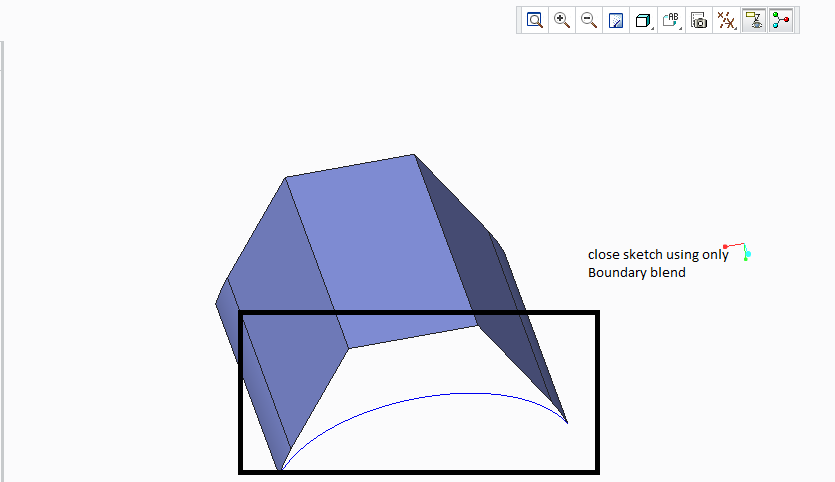
BB.png

Thank you

Babu

Best answer by rsobecki

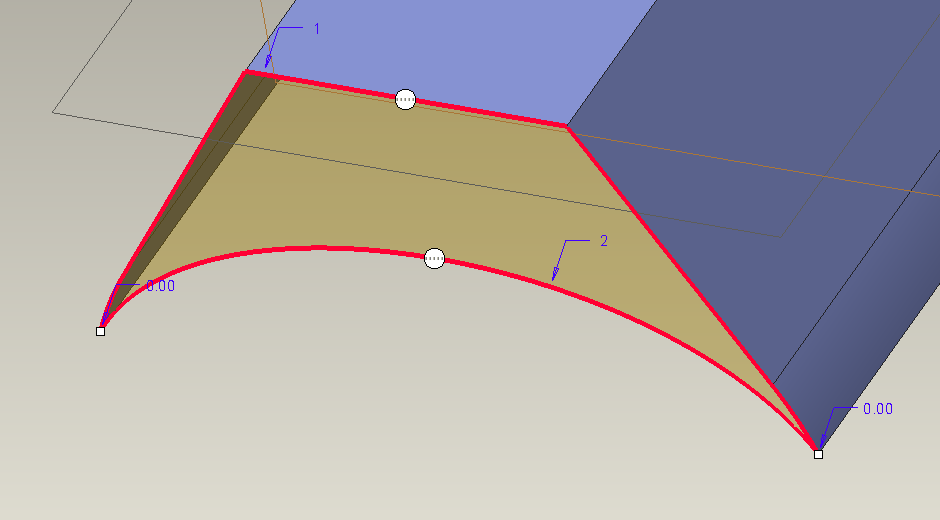
I see no problem to create this BB...

BB_test.PNG

I used standard adding non tangent boundary using <SHIFT> key.

Maybe you wish to obtain something different?

4 replies

Patriot_1776
22-Sapphire II
January 30, 2017

If it's planar, you don't need a boundary blend, just do a "Fill" surface.

rsobecki14-AlexandriteAnswer
14-Alexandrite
January 30, 2017

I see no problem to create this BB...

BB_test.PNG

I used standard adding non tangent boundary using <SHIFT> key.

Maybe you wish to obtain something different?

14-Alexandrite
January 30, 2017

Hi Babu,

Just select Boundary Blend command & select 2 chains in first direction

bndr_blnd.JPG

Pushkar

Patriot_1776
22-Sapphire II
January 30, 2017

Like I said, if it's planar, use a "Fill" surface, it's a more simple. easy feature and takes a LOT less memory.

Simple is best.