

tbraxton
22-Sapphire II
June 24, 2026
Question

Boundary blend quilt topology changing with accuracy of model

  • June 24, 2026
  • 1 reply
  • 65 views

Creo Parametric 10.0

The legacy model is in units of inches with relative accuracy; the new model is mm with absolute accuracy. The accuracies of the models are not “matched” the absolute accuracy of the new model is tighter than the legacy model relative value.

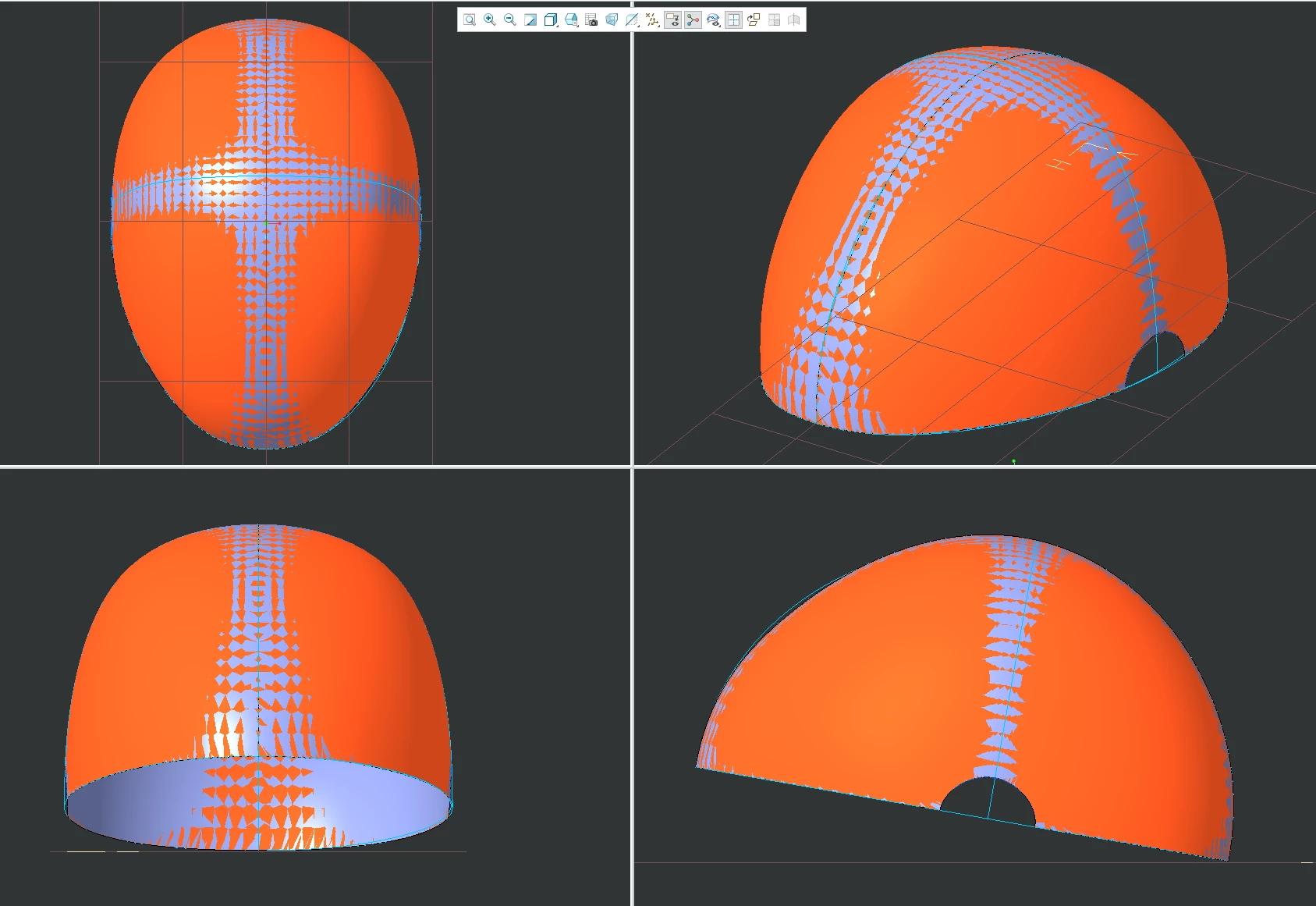
I have a legacy model that was created using relative accuracy to develop a surface using a boundary blend feature. In order to match this geometry in a new design I have created this same boundary blend in Creo 10 but the topology on the interior of the quilts is not congruent when comparing models. In the new model I used copy->paste special to copy from the legacy model to the new model all of the curves used to create the boundary blend surface feature.

Does anyone have any insight into this behavior? I have double checked that the boundary blend has been replicated using the same selections/constraints as the legacy model. All boundaries are free and there is no control point(s) defined in the boundary blends. The chains used in the boundary blend are mapped accurately to the reference (ie. order of selection of curves).

In the image below the legacy quilt is orange and the new one is purple. It is visible that the topology within the boundaries of the quilt is not congruent.
 

1 reply

Radwan Almsora
5-Regular Member
June 24, 2026

The difference in internal surface topology is caused by how the surface math reacts to the tighter absolute accuracy and different unit system of your new model.Why Topology DivergesAccuracy Dictates Math: Creo uses accuracy settings to determine the convergence tolerances for its geometric solvers. Relative accuracy scales with the overall size of the model bounding box, while absolute accuracy uses a fixed, hard-coded value regardless of size.Tighter Tolerances, More Patches: When you switch to a tighter absolute accuracy, Creo's surface solver works harder to minimize geometric deviations. To achieve this tighter fit over the exact same boundary curves, the underlying mathematical solver often creates a different distribution of internal knots, spans, or surface patches.Unit Conversion Variations: Moving from inches to millimeters changes the baseline numerical values of your boundary curves. Even though the shape is identical, the solver handles the raw numbers differently, leading to a unique internal math structure (visible as the zig-zagging zebra striping differences in your image).How to Fix ItInstead of recreating the Boundary Blend feature from scratch in the new model, use direct geometric transfer methods to ensure 100% congruent topology.Method 1: Copy-Paste the Quilt Directly (Recommended)Open your legacy model.Select the Boundary Blend quilt surface directly (not the curves).Press Ctrl+C (Copy).Open your new absolute-accuracy millimeter model.Press Ctrl+V (Paste) or use Paste Special.This copies the exact underlying surface geometry and topology, forcing the new model to accept the legacy math.Method 2: Use a Copy Geometry FeatureOpen your new model within an assembly containing the legacy model, or use a data sharing feature.Go to Model > Copy Geometry.Select the legacy model as the references model.Choose Quilts as the references type and select the orange surface.Complete the feature. This guarantees a perfect geometric match and maintains an external reference link if the original ever changes.Method 3: Temporarily Match AccuraciesCheck the exact calculated accuracy value of your legacy model (File > Prepare > Model Properties > Accuracy).Temporarily change your new model's absolute accuracy to match that exact numerical value.Re-generate or re-create your Boundary Blend feature to see if the internal topology aligns.Once the geometry matches, you can attempt to change the accuracy back, though the solver may still alter the internal topology upon regeneration.


Did you find this post helpful? If it gave you one or more solutions,

don't forget to click the Accept Solution button and leave a < like !

Radwan Almsora