
1-Visitor
February 19, 2013
Question

bug creo 2.0 M040 display the ribbon is not good

  • February 19, 2013
  • 3 replies
  • 5411 views

display the ribbon is not good
alignments icons are not correct


l'affichage des icones n'est pas correct lorsque l'on reduit la fenetre
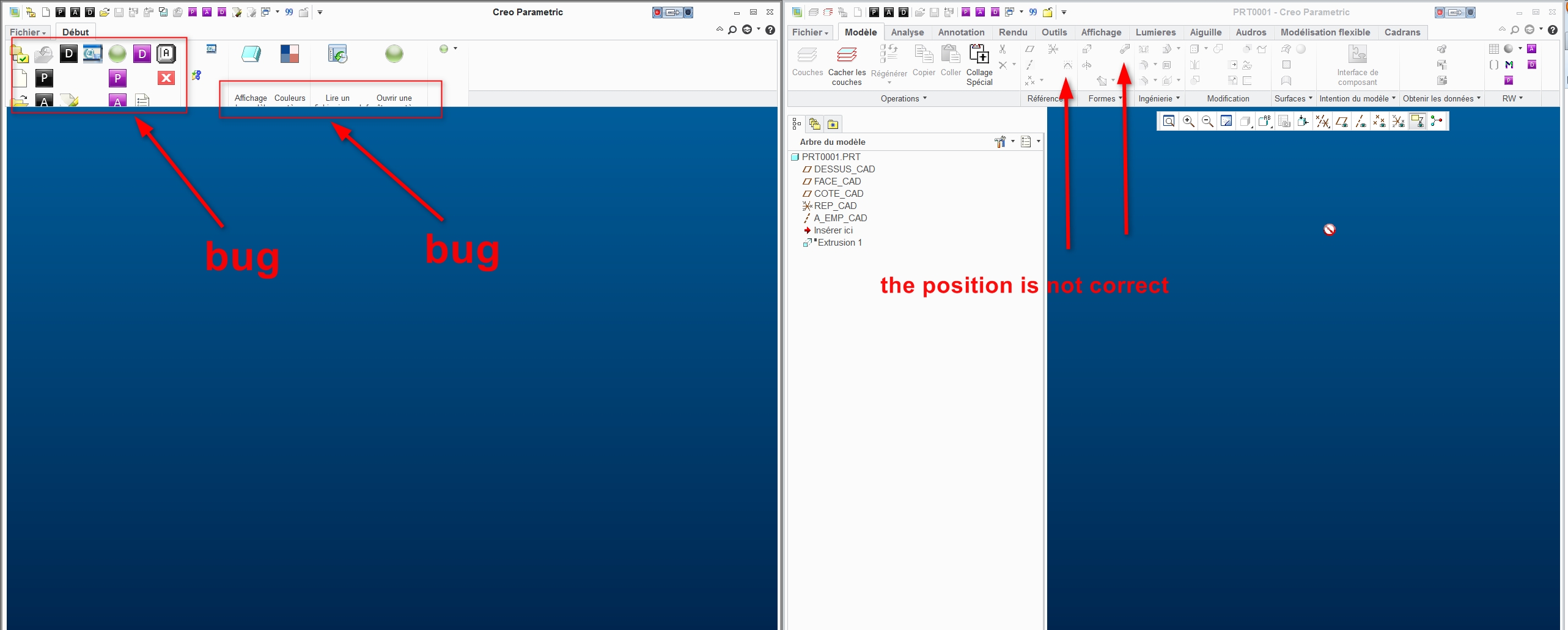


Video Link : 3751 2013-02-19_10h56_35.jpg

http://www.sendspace.com/file/alizh2

video format mp4


This thread is inactive and closed by the PTC Community Management Team. If you would like to provide a reply and re-open this thread, please notify the moderator and reference the thread. You may also use "Start a topic" button to ask a new question. Please be sure to include what version of the PTC product you are using so another community member knowledgeable about your version may be able to assist.

3 replies

17-Peridot
February 19, 2013

I haven't had this happen yet but it looks quite annoying.

1-Visitor
February 19, 2013

if you have a 27-inch screen, it's very annoying

10-Marble
February 20, 2013

It appears this is with Toolkit added icons (at least some of them). Is that correct? You may take a look at the icon size to help mitigate it, perhaps. When I narrow the window, it collapses the groups and gives a flyout.

Video Link : 3757

1-Visitor
March 20, 2013

Hi

No, it is not with icons Toolkit.
There are always tricks, but the software must run correctly.
I do not want a false solution.

17-Peridot
March 20, 2013

You will have to work with customer service to get this resolved. If they determine this to be a real problem, they will assign an SPR with software engineering to have it resolved. If it is not a problem, they will tell you why this is happening. This is why we pay maintenance, and this is how the software gets better.

I was told 2 days ago an issue had been resolved in the upcoming release. I have not heard anything for nearly 1 month.

13-Aquamarine
March 22, 2013

Philippe,

I didn't see anything in your post about Video Card or Driver. Are you using the latest Video Driver for your card? Your issues may be related to that in terms of Creo updating the display RAM. Also, does it happen with OPENGL and Win32 set for Graphics? Just some things to try first before calling it a bug.