1-Visitor
January 4, 2018
Question

Can't create rotation constraints for my part in Creo Simulate

  • January 4, 2018
  • 3 replies
  • 2060 views

The rotation constraints simulate are greyed out and i'm unabled to click them. Anyone got a solution for the problem?
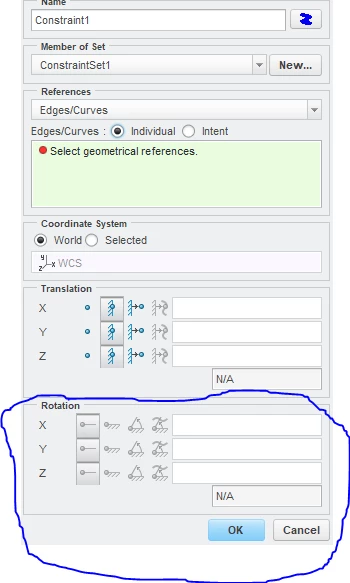

Rotation constraint.PNG

3 replies

skunks
19-Tanzanite
January 4, 2018

please create a beam or a shell

15-Moonstone
January 4, 2018

Hello,
Look at this link, if it helps you like that for me.

https://community.ptc.com/t5/Creo-Modeling-Questions/How-to-measure-the-rotation-angle-in-simulation/m-p/478142#M111499

Thanks again pkloninger-2.
Cordially.
Denis.

16-Pearl
January 4, 2018

Does your model have 3D geometry only? You can't apply rotational constraints to 3D geometry. (Rotations are eliminated by the adjacent nodes of the 3D elements.)

skunks
19-Tanzanite
January 4, 2018

Hello Martin,


3D geometry AND a RIGID LINK:

I can apply rotational constraints to 3D geometry.


regards

paul