

Solved
Can't get rid of extra curves in merged part
I have a part that merges into another part.
The original part has projected curves which will be stamping. I have saved the view status so it only shows these curves on my Solid Model.
When I merge this model into another part model it brings in not only the curves that I do need, but also several sketches that were used in the original model file. SEE ATTACHED and note the light and dark blue curves that are on a flat plane.
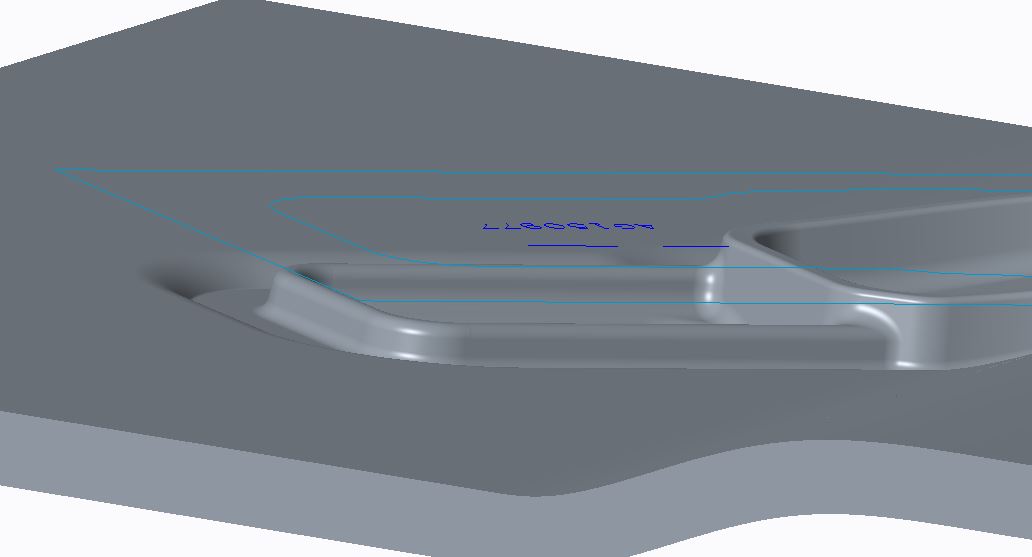
If you can't get rid of the original sketch curves by doing a Save Status in the original model how do you get rid of these?
When I go back to the original part model I only see the curves that I want to see, not the curves from the originating sketches.
This thread is inactive and closed by the PTC Community Management Team. If you would like to provide a reply and re-open this thread, please notify the moderator and reference the thread. You may also use "Start a topic" button to ask a new question. Please be sure to include what version of the PTC product you are using so another community member knowledgeable about your version may be able to assist.