15-Moonstone
November 9, 2021
Solved

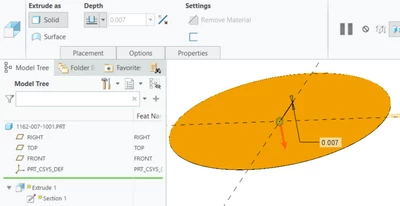
Can't modify the thickness of a simple part. It is grayed out!
  • November 9, 2021
  • 5 replies
  • 5452 views

JS_9824412_0-1636475982496.png

Thanks for any hints for solving this efficiency issue.

Best answer by JS_9824412

I revisited the problem by duplicating again the assembly and the part, and found out the culprit is a relation created in the assembly. This relation is not shown in the part mode, but in the assembly mode. It turned out that the grayed out thickness is set to be proportional to a thickness of some other part in the assembly. (The batch of relations were created by myself one year ago).


Thanks for the hints! Especially the one to check the "message at the bottom of the screen" (and "check Message area -" from Martin).

5 replies

23-Emerald III
November 9, 2021

Which direction are you trying to modify the thickness, thicker or thinner?

Thicker should not be a problem.

Thinner may cause issues with your object tolerance settings. With a large diameter, you may not be able to get it as thin as you want with the default tolerance setting. Also, if Creo 7 or 8, the default tolerance has changed from relative to absolute. Is your start part a pre Creo 7 file where the tolerance has not been reset to the 'new' default.

Adjust your tolerance numbers and see if that changes the ability to make the part thinner.

15-Moonstone
November 9, 2021

Thanks for your hint.


The part is created by "save as" in Windchill to duplicate an existing assembly and its drawing in CREO 6, one of its components is the "father" of this part. This new part is not locked in Windchill. Originally the part is 0.007" thick. I want to make it thicker. (Also curious about what is the point for PTC to gray the thickness cell out?)


24-Ruby III
November 10, 2021

Hi,

modify dimension value in Part mode (not during Edit Definition mode) and check Message area - maybe Creo displays some error message.

15-Moonstone
November 10, 2021

Thanks,


It was in Part mode. I also clicked on the dimension shown in the screen area. Creo didn't throw any error message.


Thanks,

Have a good day.

19-Tanzanite
November 11, 2021

It really sounds like a feature-level relation is locking the thickness dimension of your disc extrusion.  Otherwise, it's some Windchill voodo, I'd say.


Clicking on a dimension in the graphics window will not throw a warning, but double-clicking (i.e. attempting to modify it) might show a message at the bottom of the screen such as Dimension in PART_MODEL is driven by relation d1=0.007.

Also, right-click on the feature containing the dimension and then select Information->Feature Information.  The resulting window has the Relation table at the bottom, and it might tell you something more.


Funny thing is, a feature-level relation can modify dimensions of other features (including the features that come AFTER), so you might have to check the 4 datum features ahead of this extrusion.


kdirth
21-Topaz I
21-Topaz I
November 10, 2021

I would guess it is relation driven.  Check for relations in the feature.

There is always more to learn.
15-Moonstone
November 10, 2021

Thanks. I checked {Relations, Dependencies, Parameters, Lock/Unlock in Windchill, etc.} and couldn't find the cause. Maybe it was just a computer glitch or tiny virus. I ended up with creating a new part to Replace the "infected". Luckily it is a very simple geometry.


Thanks,

Have a good day.

A SolidWorks Lover

1-Visitor
July 29, 2025

Yes, old post, I know. However, I experience this w/ Sheetmetal part modeling when I start w/ a sketch (for flange length lets say) and then extrude (first wall). Edit definition has thickness locked in the window, and clicking "d1" to show the dimensions on screen and double clicking on the ".0XX THICK" dimension will prompt the comment "Read-only value can not be modified"... I'm no expert in how our part templates and sheet metal parameters are set up for default, but I am forced to go into parameters, locate "SMT_THICKNESS" and change the value in that window. Regenerate and it's done. Thought I'd mention this and maybe save someone 15 minutes.... 

20-Turquoise
July 29, 2025

@BM_6654910 wrote:

Yes, old post, I know. However, I experience this w/ Sheetmetal part modeling when I start w/ a sketch (for flange length lets say) and then extrude (first wall). Edit definition has thickness locked in the window, and clicking "d1" to show the dimensions on screen and double clicking on the ".0XX THICK" dimension will prompt the comment "Read-only value can not be modified"... I'm no expert in how our part templates and sheet metal parameters are set up for default, but I am forced to go into parameters, locate "SMT_THICKNESS" and change the value in that window. Regenerate and it's done. Thought I'd mention this and maybe save someone 15 minutes.... 


CS419845: Thickness is greyed/grayed out during Edit Definition of a Sheetmetal Wall in Creo Parametric 11.0 

4-Participant
January 22, 2026

I has the same issue. This is what worked for me 

File -> Prepare -> Model Properties 

This will open a pop-up window. Search for the section Sheetmetal. The second option under this would be 'Thickness.'  Click on 'Change'