
12-Amethyst
March 6, 2026
Solved

Can't repair the model with IDD

  • March 6, 2026
  • 2 replies
  • 423 views

I have an imported STEP with what looks like a small number of errors: 10 bad two-sided edges and one bad wireframe and, wow, 75 bad vertices.

There's one particular inside radius that seems to defy any attempt to fix.
Best answer by tbraxton

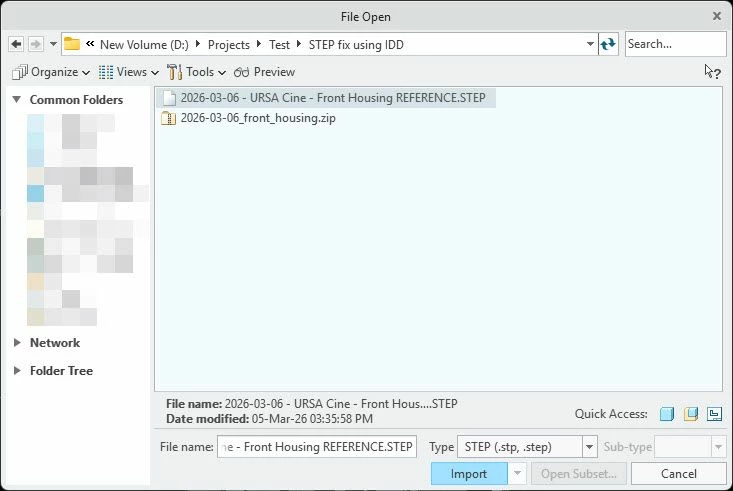
Open the STEP file directly in Creo (do not use a start part) and report back the results. Your start parts could very well be the issue, this is why I inquired exactly how you were bringing the STEP data in.


Use file open without a template as shown below.


2026-03-06_10-50-29.jpg

2 replies

22-Sapphire II
March 6, 2026

I just opened your posted STEP file in Creo 10.0.9.0 and the model imports into Creo as a solid body. There are geom checks but IDD interaction is not needed in my case to get the geometry to solidify.


Describe exactly the steps you execute when getting the STEP file into Creo and what version you are using.


2026-03-06_09-56-11.jpg

23-Emerald III
March 6, 2026

The most common solution to import errors is letting the imported part drive the accuracy!


2026-03-06_12-00-14.jpg

12-Amethyst
March 6, 2026

This is great news. Unfortunately, this is not what I get.


Screenshot 2026-03-06 102145.png

Screenshot 2026-03-06 102229.png


12-Amethyst
March 6, 2026

This is with Creo Parametric 10.0.7.0