1-Visitor
June 2, 2022
Solved

Cant extrude a sketch when it says feature was done correctly

  • June 2, 2022
  • 4 replies
  • 3901 views

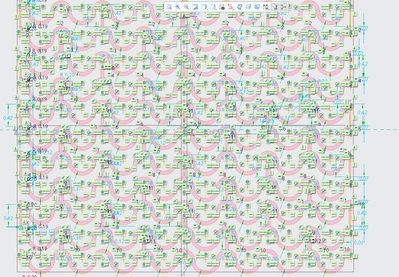
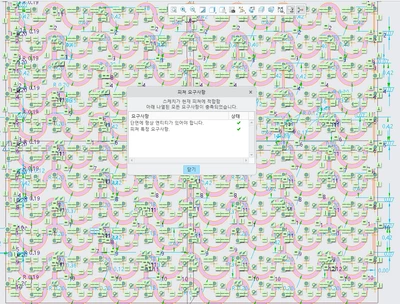
The shapes are highlighted and the features are all checked yet when i extrude it, it says couldnt make a feature is this a bug?
Creo.png

Creo2.png

Best answer by KenFarley

There's definitely a limit on sketch entities (I found it when trying to import an AutoCAD DXF file, but can't remember the number). Also, this kind of sketch is a perfect example of one that will become "unstable" later. I've caused myself a lot of trouble making overly complex sketches in the past and eventually ended up completely redefining the models I did.

Having several simple features is *always* better than trying to pack everything into one feature. Just sorting out the constraints is enough to drive a person mad...

4 replies

23-Emerald IV
June 2, 2022

Wow, that is complicated.  Have you considered making one row and then patterning it after the feature has been created?


To troubleshoot stuff like this, Save a copy of the part and then try deleting half the sketch.  If it works you know the problem was in the other half.  Keep removing different areas of the sketch until you figure out where the problem is.  Frankly I wouldn't be surprised if there is some limit on how much can be contained in a single sketch...

KenFarley21-Topaz IIAnswer
21-Topaz II
June 2, 2022

There's definitely a limit on sketch entities (I found it when trying to import an AutoCAD DXF file, but can't remember the number). Also, this kind of sketch is a perfect example of one that will become "unstable" later. I've caused myself a lot of trouble making overly complex sketches in the past and eventually ended up completely redefining the models I did.

Having several simple features is *always* better than trying to pack everything into one feature. Just sorting out the constraints is enough to drive a person mad...

1-Visitor
June 4, 2022

Yeah.... i just recreate everyting from scratch but simpler...

23-Emerald III
June 2, 2022

What version of Creo are you using?

I agree with Tom, make the sketch simpler and then pattern the results of a simpler extrude. 

There could be a limitation in the number of entities in the sketch to be extruded.

Keep It Simple!!

1-Visitor
June 2, 2022

I'm currently using creo 6 i'll try simplyfying it

kdirth
21-Topaz I
21-Topaz I
June 2, 2022

I would suggest this is your base feature: 

kdirth_0-1654192173531.png

Pattern it in two directions then add connection feature, with patterns.

There is always more to learn.
19-Tanzanite
June 2, 2022

is your model set to relative accuracy?

21-Topaz I
June 3, 2022

Hi @철박_10230212 

Your sketch although passing the Sketch Requirement fails to Extrude.
Being not fluent in reading Korean, i assume the second picture is the sketch requirement window that green lights the sketch and despite it, Creo refuses to Extrude. Am I correct?

If yes, what exactly does the error message look like? 


Agreeing with all previous recommendation to simplify too.

1-Visitor
June 4, 2022

there were no particular error messages it just says couldnt create a feature

21-Topaz I
June 7, 2022

Right.
Do you mind sharing the model?

