
1-Visitor
May 30, 2017
Question

Centerline Style - Creo Drawing

  • May 30, 2017
  • 2 replies
  • 7650 views

How do I control the Hole Centerline style in a Creo 2.0 drawing? 


The extents of the Centerlines project at least 5 times further than the diameter of the hole! 


Thanks! 5-30-2017 12-26-19 PM.jpg
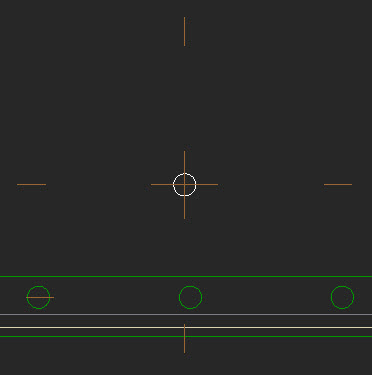
Message was edited by: Dan ONeill Added image...

2 replies

doneill-21-VisitorAuthor
1-Visitor
May 30, 2017

It should be in the same place where you would control the default offset of your dimension witness lines... which I can't find either.. 

2-Explorer
May 31, 2017

Hello Dan ONeill

let´s try to add in your *.DTL file following configs:

A) axis_line_offset --- default value 0,1

B) circle_axis_offset --- default value 0,1

axis.jpg

One of this configs should help.

See attached list of *.DTL file configs. Description is in czech language, but configs itself are english and sometimes it can help.

Regards

Milan Bonka

doneill-21-VisitorAuthor
1-Visitor
May 31, 2017

Thank you for your help!

I ended up going thru:

     FILE... Prepare... Drawing Properties... Detail Options...

I found the properties you pointed out... but it took a lot of trial & error to finally come up with what I wanted.

I settled on:

     axis_interior_clipping     no

     axis_line_offset             -1.0

     circle_axis_offset           0.5

One other thing... It looks like once you drag the end of the axis there is no way to get it to reset back to the default.

You just have to drag it back...

Thanks again for the help.

2-Explorer
June 1, 2017

The same situation here.

It´s about testing...

Can´t give you better advice...