
10-Marble
November 21, 2014
Question

Change section line color

  • November 21, 2014
  • 1 reply
  • 3144 views

Hello all, I need change default section line color. I want to change the color defined by the user. Red, yellow, green.....


For a better view of the section line..


And use the same color for export to PDF.


Any idea how???
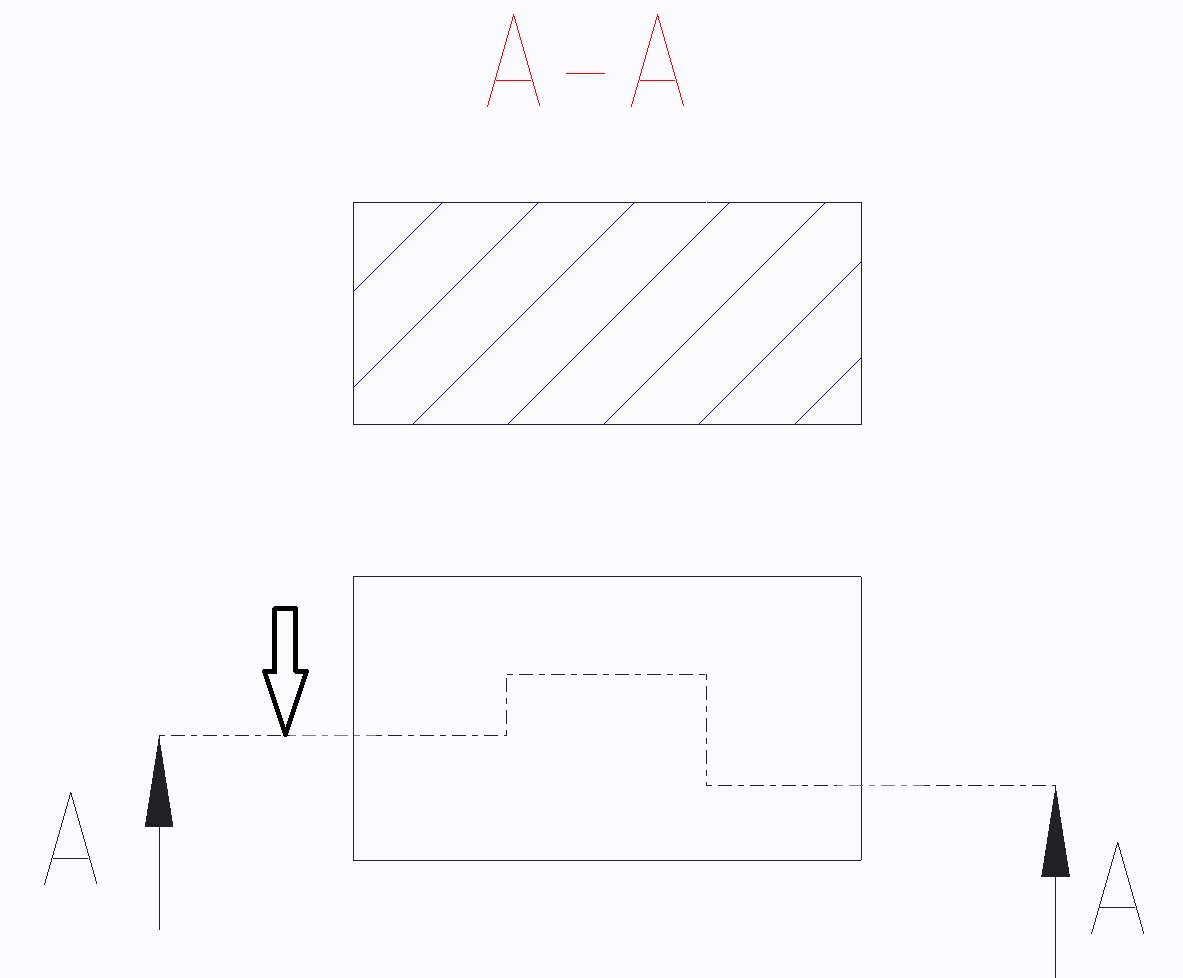
 

01.jpg


In Creo 2.0


This thread is inactive and closed by the PTC Community Management Team. If you would like to provide a reply and re-open this thread, please notify the moderator and reference the thread. You may also use "Start a topic" button to ask a new question. Please be sure to include what version of the PTC product you are using so another community member knowledgeable about your version may be able to assist.

1 reply

Mahesh_Sharma
22-Sapphire I
December 9, 2014

Radek,

You can try setting line style for hatching by selecting hatch lines > Right Click > Properties > Line Style > Change color.

Section.png

Pliska10-MarbleAuthor
10-Marble
January 6, 2015

Hello Mahesh, Happy New Year 2015. Thank you for your answer, but I thought the cut line. (Dashed line)

Mahesh_Sharma
22-Sapphire I
January 6, 2015

Hi Radek,

Happy new year to you too.

I am sorry, I overlooked the image and missed the arrow for dash line.

Color for arrow line cannot change to any other color. It will follow the geometry color.