

Change Task screen shows Windchill Error
This is a bit baffling.
The test account in the Documentation Services group that's in the Change Administrator role (in the Team and in the Workflow) is sent a task.
They can see the task as normal in My Tasks, but when they open the task, the Details page displays
Windchill Error
You do not have access to this object or it does not exist.
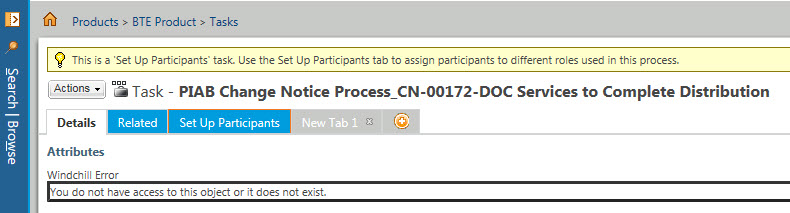
Thing is, if I reassign that task to another test account (wctest1) not in the Documentation Services group (who is in the Change Administrator role) they CAN see it. The Doc Service account cannot reassign the task, so I need to do that as Admin.
I cant think of any access to the Role that I have not already granted.
If I add the wctest1 to the Documentation Services group then nothing changes for that user so I don't think its an access control on that Change Administrator Role.
The only other clue is that the same test account (Documentation Services group in Change Administrator role) gets a (Secured information) when looking at the Assignee on the task.
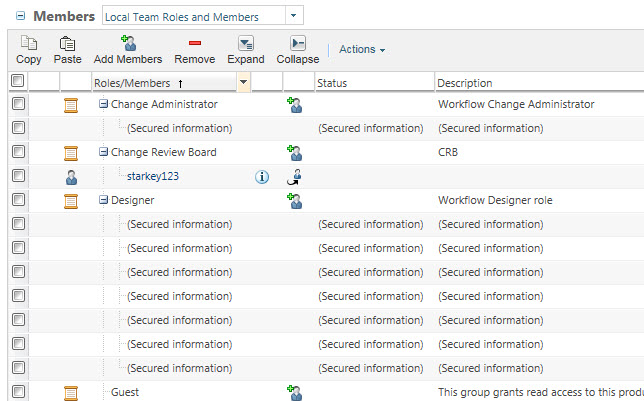
The user in the Change Administrator role cannot see the Change Process in the Routing/Process History?
Perhaps there is an access control for workflows?
This thread is inactive and closed by the PTC Community Management Team. If you would like to provide a reply and re-open this thread, please notify the moderator and reference the thread. You may also use "Start a topic" button to ask a new question. Please be sure to include what version of the PTC product you are using so another community member knowledgeable about your version may be able to assist.