1-Visitor
August 13, 2019
Solved

Closed corner - Creo 3

  • August 13, 2019
  • 3 replies
  • 5135 views

Hello Creo's,


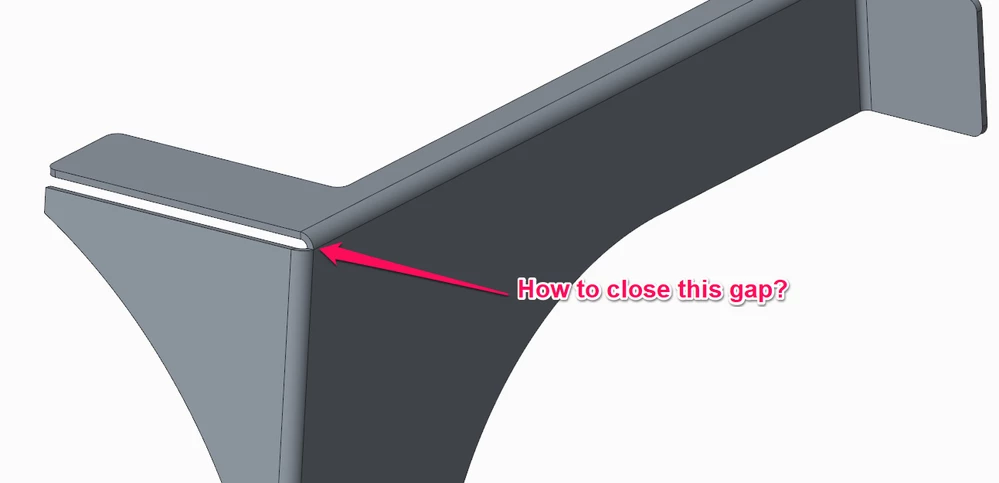
I am looking for the answer on how to close the corner as shown in the picture below:


CREO- SHEETMETAL 01.png


thank you,

regards,

Arek

Best answer by kdirth

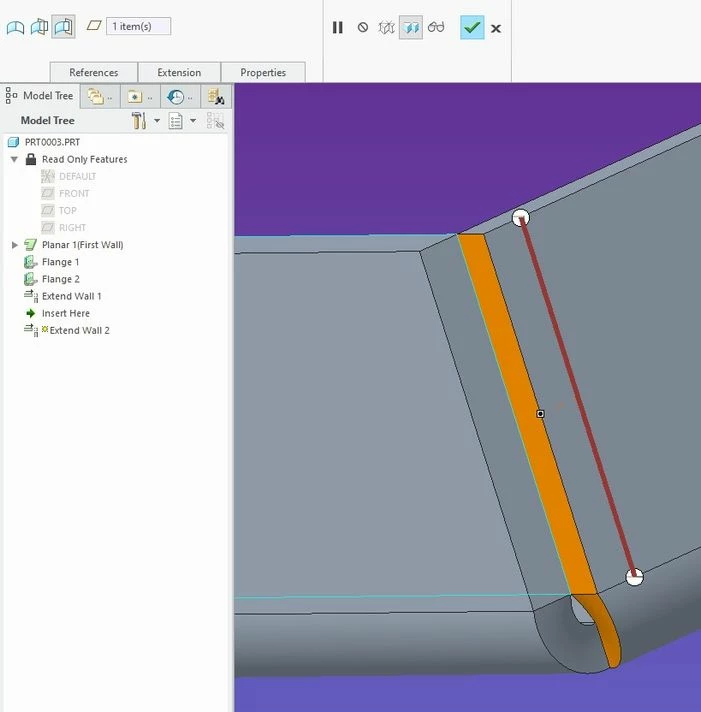
Select the edge of one of the flanges, then select Extend from the Editing menu.  Define how you want it extended and repeat for second wall.


Annotation 2019-08-13 153240.jpg

3 replies

Mahesh_Sharma
22-Sapphire I
August 13, 2019

@ArekTRI 


I think these are two flat walls, if yes.. you may try creating a flange wall with no corner relief .


Or try using Extend option, select edge of one wall > Extend > Select Reference to define TO Location. 

23-Emerald III
August 13, 2019

Create an additional flange with a .001 flange length on one of the 2 edges. That will close the gap except in the very corner where the 3 blends merge. When they weld the seams, they can fill in the corner gap.

ArekTRI1-VisitorAuthor
1-Visitor
August 13, 2019

Hi @Mahesh_Sharma & @BenLoosli 

thank you for a quick response.


I now this method you provided and it is quite time-consuming.

I am looking for something more automatic like a command which I can find in different CAD packages.


Regards,

Arek

kdirth
21-Topaz I
kdirth21-Topaz IAnswer
21-Topaz I
August 13, 2019

Select the edge of one of the flanges, then select Extend from the Editing menu.  Define how you want it extended and repeat for second wall.


Annotation 2019-08-13 153240.jpg

There is always more to learn.
ArekTRI1-VisitorAuthor
1-Visitor
August 14, 2019

Hi @kdirth 


thank you for the tip. I appreciate that.

The bigger issue is, I have to do extra 4-5 mouse clicks plus using Alt key to achieve what I need.


Regards,

Arek

kdirth
21-Topaz I
21-Topaz I
August 14, 2019

Sorry, no easy buttons in CREOSmiley Wink  I do not know of any easier way to close the corner gap. 


I do like to use conversion by shell when there are several corners.  The conversion feature does a good job of creating the corner geometry.

There is always more to learn.