

Solved
Color control when exporting to .dwg format
Is there a place where you can control/set these parameters (globally) for every time a drawing is exported to .dwg format?
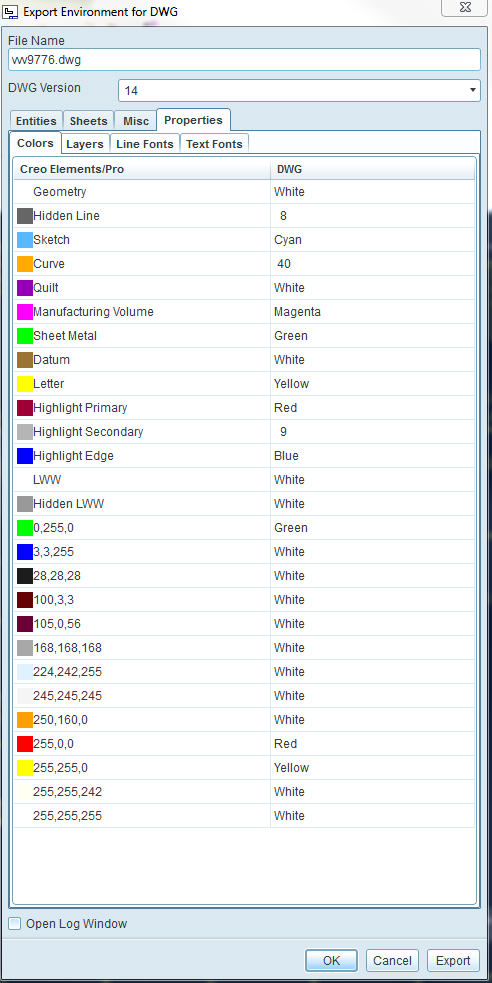
Thanks, Dale

Is there a place where you can control/set these parameters (globally) for every time a drawing is exported to .dwg format?
Thanks, Dale
Dale,
Try changing the word "white" to "7".
Also, double check that the file is being read in properly. Check the trail file and/or the std.out file for any errors.
This is what we're using:
map_color BACKGROUND_COLOR 7
map_color DIMMED_COLOR 7
map_color LETTER_COLOR 7
map_color HIGHLIGHT_COLOR 7
map_color EDGE_HIGHLIGHT_COLOR 7
map_color GEOMETRY_COLOR 7
map_color HIDDEN_COLOR 7
map_color SHEETMETAL_COLOR 7
map_color CURVE_COLOR 7
map_color VOLUME_COLOR 7
map_color SECTION_COLOR 7
map_color PRESEL_HIGHLIGHT_COLOR 7
map_color SELECTED_COLOR 7
map_color SECONDARY_SELECTED_COLOR 7
map_color PREVIEW_GEOM_COLOR 7
map_color SECONDARY_PREVIEW_COLOR 7
map_color DATUM_COLOR 7
map_color QUILT_COLOR 7
No account yet? Create an account
Enter your E-mail address. We'll send you an e-mail with instructions to reset your password.