
1-Visitor
October 15, 2010
Solved

Common name

  • October 15, 2010
  • 2 replies
  • 12663 views

Hi out there

Is there a way to change the common name of a part.

A part with me has in the asm tabel a number and a common name.

I can change the number by opening the part and rename it, the common name can I not rename that way.

Anyone knows the answer?

Regards

Chris


This thread is inactive and closed by the PTC Community Management Team. If you would like to provide a reply and re-open this thread, please notify the moderator and reference the thread. You may also use "Start a topic" button to ask a new question. Please be sure to include what version of the PTC product you are using so another community member knowledgeable about your version may be able to assist.
Best answer by pwyndham

Ok, so you just have the Pro/E files stored on server drives. In theory that should make changing the common name easy.

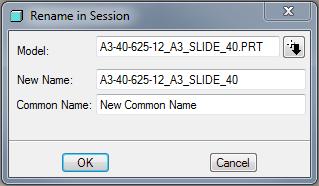
But, I take it when you have Pro/E open and you open the part and go File -> Rename you do not get the option to change the common name, like this:

CommonName.jpg

2 replies

1-Visitor
October 15, 2010

Do you have your parts in the Windows files system on storage drives or in a PDM system?

chris51-VisitorAuthor
1-Visitor
October 15, 2010

Hellow Paul

I can only see the number in the windows files system on a server storage drive.

There is no PDM system that I know. Is that a system that gives numbers automaticaly?

If it is we do not have that, I am the only one here who works as designer and on Pro-e.

For the magasin we have another numbering system that is not connected with pro-e in any way.

Hope this helps you to give an answer.

Regards

Chris

pwyndham1-VisitorAnswer
1-Visitor
October 15, 2010

Ok, so you just have the Pro/E files stored on server drives. In theory that should make changing the common name easy.

But, I take it when you have Pro/E open and you open the part and go File -> Rename you do not get the option to change the common name, like this:

CommonName.jpg

24-Ruby III
October 19, 2010

Chris,

you can also change Common Name using the following procedure.

1.] Create the temporary relation in the part (which you want to rename)

PTC_COMMON_NAME="new common name"

2.] Regenerate part

3.] Remove temporary relation (created in 1.])

4.] Rename part (you will see new common name in Rename dialog)

Martin