14-Alexandrite
January 5, 2023
Solved

Control slider constraint with parameter

  • January 5, 2023
  • 3 replies
  • 4030 views

Hi community

Is it possible to drive constraint with parameter ?

In my example with slider :
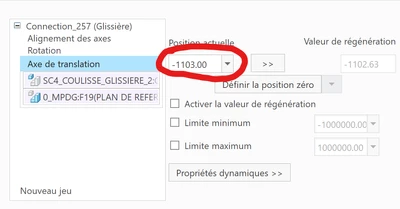
Capture d’écran 2023-01-05 140631.png


I want to drive actual slider position (value in red circle) with parameter

it is possible ?

thanks

Best answer by pausob

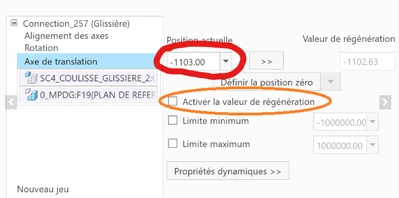
Typically, you would check the "enable regeneration value" box to turn the joint into a "driver" and make the dimension available for use in relations.

pausob_0-1672955861015.png


3 replies

XDN14-AlexandriteAuthor
14-Alexandrite
January 5, 2023

Another things, in reality, the mechanism is more complex, but is it possible to simplify it with slider in this example

in MDO, i make a servomotor with position. is it possible to control the servomotor position value with a paramter ?

in fact, i calculate my parameter value with Mathcad and i use parameter value in Creo from Mathcad.

Obsiouvly i can make a text file with slider value in Mathcad, and i import this file with servomotor table.

But is not a flexible solution...

I use this solution when i want to make a trajectory with slider ( i use sucessive lot of position for this)


What i would like :

i calculate value with Mathcad

i imput this value in a Creo parameter, and control the slider position with this parameter (Mathcad update it when i want a another value)

this is a point to point behavior, i use it   to find and analisys singularity point point which Mathcad find


anyone have an idea ?

tbraxton
22-Sapphire II
22-Sapphire II
January 5, 2023

Yes, it is possible. I would suggest creating a motion skeleton and putting the parameter in the skeleton model which is used to drive the assembly of solid bodies.


Motion skeleton used to design mechanisms example.

https://community.ptc.com/t5/3D-Part-Assembly-Design/Did-You-Know-How-to-Use-Motion-Skeletons-to-Quickly-Design/td-p/443038 

XDN14-AlexandriteAuthor
14-Alexandrite
January 5, 2023

it's difficult to apply the motion skeleton.

Because in reality my mecanism is a parallel robot.

on parallel robot is difficult tho find a direct kinematic model (because often it is not directly calculable, then Creo will not be able to solve the model, i use Mathcad to solve it)

in this case, it is easier to do the calculation with mathcad.

is for this, i want just control parameter value with Creo


in parameter for slider, i find this

Capture d’écran 2023-01-05 164248.png

it will suffice that there is a parameter for the position, after with simply relation, mathcad can drive a slider

is it possible that there are hidden parameters that control the rest of the slider definition?


Another way is:

Make some points and drive the coordinate points with Mathcad parameter

after i contrainst 3D body on this points

this way is good for point to point analysis.

In this case a calculate all points with reverse kinematic model (is simply for parallel robot)

the movement of the slider is not controlled, its position is a consequence of the Mathcad calculation

But if i use this, I can no longer make a trajectory with servomotor


If i want to use servomotor, for move slider, its necessary to use direct kinematic model

and now the movement of the slider is  controlled with servomotor table. The servomotor table is consequence of the Mathcad calculation

and finally it's possible to play trajectory


the 2 previous way work, but is necessary to reassemble the 3D model... when the model is complicated it is painful


this is how I came to the conclusion that the easiest way is to control the position parameter of the slider. With an "if" loop it will be easy to choose between point-to-point operation and trajectory operation In any case, Mathcad takes care of the calculation


XDN14-AlexandriteAuthor
14-Alexandrite
January 5, 2023

another option is to write same value in slider parameter

  • translation minimum limit
  • translation maximum limit

But is don't work

pausob19-TanzaniteAnswer
19-Tanzanite
January 5, 2023

Typically, you would check the "enable regeneration value" box to turn the joint into a "driver" and make the dimension available for use in relations.

pausob_0-1672955861015.png


XDN14-AlexandriteAuthor
14-Alexandrite
January 6, 2023

after check the box, i don't have a new parameter for slider 😥

XDN14-AlexandriteAuthor
14-Alexandrite
January 6, 2023

After many test i have 2 solutions:

first way :

i make a slider contrainst

i make point on the axis slider. This point come from a mathcad calculus parameter

after, i make a rigid contraint between this point and mobile part of a slider.
But Creo don't want this two contraint simultaneously

Then it's easy to make a "if" loop in relation window, with a choice parameter.

example:
Parameter_choice = 0 
PTC_CONSTRAINT_SET for slider contrainst turn off
PTC_CONSTRAINT_SET for rigid contrainst turn on
Now the 3D assembly are driving by the rigid mathcad point

or

Parameter_choice = 1
PTC_CONSTRAINT_SET for slider contrainst turn on
PTC_CONSTRAINT_SET for rigid contrainst turn off
Now the 3D assembly are driving by freehand or by servomotor
(servomotor has driving by mathcad file, with a lot off point for make a trajectory)

Another things, just is necessary to turn off servomotor in modeltree (i don't have pro/program for automate it)


second way
the pausob's solution

check "enable regeneration value" in slider definition
and click the the slider part in 3D window, now you see the value
after it, is simply to drive the value in relation windows with mathcad parameter following the usual method


Finally, i choice the first way !

the second way make probleme because is necessary to re-open the contrainst definition window to update 3D model

for first solution , i don't have this problem, the 3D model is directly right !

for switchind betwenn trajectory mode and point to point mode, i just have modify this choice parameter ! it's great and simple finally!

thanks for your aid