14-Alexandrite
June 8, 2022
Solved

Copy, Paste Special. Any way to get the ref lines to show up better?

  • June 8, 2022
  • 1 reply
  • 1188 views

Hi Guys,


When doing a copy, paste special. 


You know how it shows you the edge or surface wire frame it wants you to use as reference for pasting on new part? 


How can i make this MUCH thicker? I know i can change the color, but its VERY hard to see what its wanting me to select most of the time. 


Anyone else have this issue ? I dont remember this being an issue in Creo 3. (now on creo 7.0.6.0)


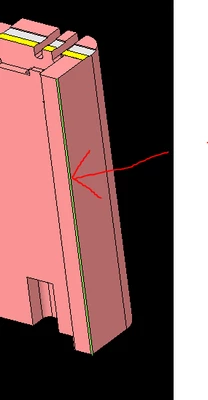
see this lime green edge? Yeah me neither. LOL (though this is much easier to see than some small little edge or something)
dunebuggyjay_0-1654726832086.png


Thanks,

Jay

Best answer by pausob

Lol, I know what you mean.  I often end up "cycling" through the references and trying to spot where the system makes that tiny change in the displayed image.


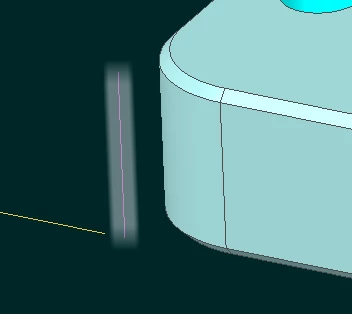
Playing with the config.pro options for "selection glow" might help.

pausob_0-1654782978971.png

(wow, that's not quite how it looks on my screen, but the glow does add a "thickness" to the highlight)


Here are my config.pro settings :

enable_selection_glow yes
glow_blur_radius 12
glow_blur_sigma 6.3
glow_blur_type -1
glow_line_width 6

There is a message on this forum that explains what all these (undocumented?) options do, but I can't find it at the moment.

1 reply

pausob19-TanzaniteAnswer
19-Tanzanite
June 9, 2022

Lol, I know what you mean.  I often end up "cycling" through the references and trying to spot where the system makes that tiny change in the displayed image.


Playing with the config.pro options for "selection glow" might help.

pausob_0-1654782978971.png

(wow, that's not quite how it looks on my screen, but the glow does add a "thickness" to the highlight)


Here are my config.pro settings :

enable_selection_glow yes
glow_blur_radius 12
glow_blur_sigma 6.3
glow_blur_type -1
glow_line_width 6

There is a message on this forum that explains what all these (undocumented?) options do, but I can't find it at the moment.

23-Emerald IV
June 9, 2022

@pausob wrote:
There is a message on this forum that explains what all these (undocumented?) options do, but I can't find it at the moment.

https://community.ptc.com/t5/3D-Part-Assembly-Design/how-to-turn-on-neon-effects-for-selected-feature-or-dimension/m-p/199789/highlight/true#M32069