14-Alexandrite
December 16, 2022
Solved

Copy surface by CSYS

  • December 16, 2022
  • 2 replies
  • 2860 views

Hey Creo gurus,


What is your best method to copy - move a surface (or quilt) from a CSYS location to another?


Copy - Paste Special - Transformation only allows one DOF at a time. I want to just select an original and new CSYS to place a copy of this surface from CS0 to CS1.


 

VMcD_0-1671226574986.png


Best answer by tbraxton

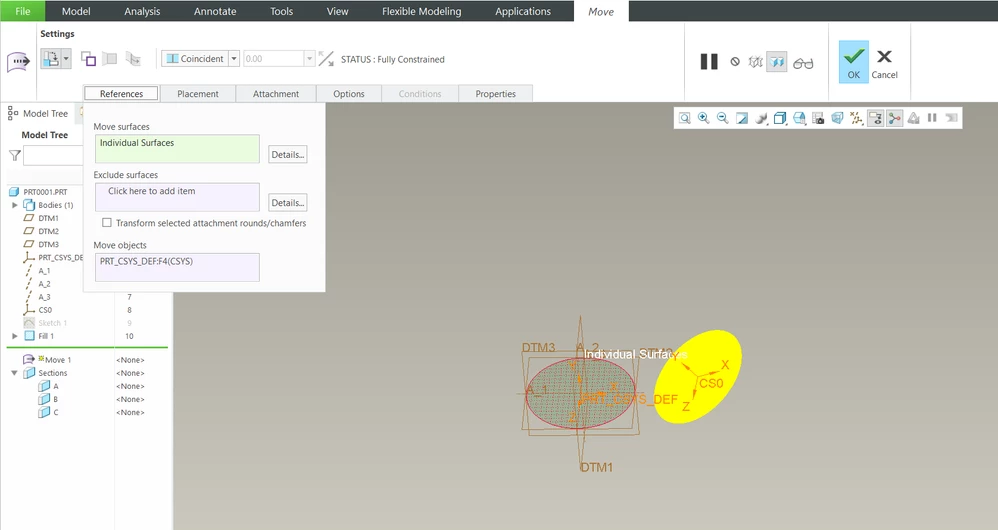
The functionality you want has been moved to the flexible modeling tab. I do not recall when they moved it there. It is now the current implementation of the old surface transform function.

tbraxton_0-1671228298047.png


2 replies

tbraxton
22-Sapphire II
tbraxton22-Sapphire IIAnswer
22-Sapphire II
December 16, 2022

The functionality you want has been moved to the flexible modeling tab. I do not recall when they moved it there. It is now the current implementation of the old surface transform function.

tbraxton_0-1671228298047.png


VMcD14-AlexandriteAuthor
14-Alexandrite
December 19, 2022

Thank you, this Move function is the only one I found.

tbraxton
22-Sapphire II
22-Sapphire II
December 16, 2022

Your question reminded me to check on an SPR associated with this topic. It still has not been fixed so refer to this support article. I would appreciate it if you would open a case with PTC and refer to this article since they still have not fixed the Copy Move option in this feature. 


https://www.ptc.com/en/support/article/CS353572?source=Case%20Viewer 

18-Opal
December 22, 2022

To achieve what you want to achieve (transform a copy of a quilt based on CSYS alignments), you can use FMX-Move and:


  1. select the quilt into the references collector (This is the recommended/best option. Typically you would want to do that for a body as well). That way it is selected as a “quilt-object” and not as a collection of surfaces
  2. If you do select it as a collection of surfaces, then you have to uncheck the “attachment”-option (unless the quilt is a closed quilt in which case it couldn’t attach to anything anyway).

Please have a look at this quick video illustrating the workflows:


Will check with my colleagues to get the article updated.

15-Moonstone
February 28, 2023

@mneumueller 


Could this be improved to allow transforming to a list of several CSYS? Currently we have to redo the same command when we want to copy the same source quilts to several destinations. It would be nice if it worked more like the Instance Geometry in NX5 or NX6. Please see the beginning of this video:


instance geometry (Full Video Tutorial Unigraphic NX6) - YouTube


When the user needs several instanced copies of an original quilt, it only needes to select the source geometry and source CSYS once, then, on the destination, he can click several target CSYS to specify several destinations in a list. I don't know if in NX it works this way, but if Creo would allow this kind of source CSYS to target CSYS list, instead of copying one instance at a time, Creo could leverage the list of CSYS to allow the Reference Pattern work. Currently we can use sketch CSYS to position geometry and pattern using CSYS on the sketch, but all of those CSYS are 2D constrained, only can be positioned or rotated in Z, normal to the sketch. It's a limitation that Creo do not allow this free CSYS to CSYS geometry pattern to a list of destination CSYS. Using Pattern Tables to specify rotation or offset around X, Y, Z works sometimes, but only when we know the angles of the targer CSYS, which is not always the case.