
1-Visitor
July 2, 2015
Question

Cratered Surface

  • July 2, 2015
  • 5 replies
  • 6181 views

Hi all, i have received an igs model which i am being asked to reproduce in Creo 3. The model contains some very rough bumped up surfaces, you might describe as 'cratered', like the surface of the moon, so to speak. These surfaces are actual surfaces, not just texture applied to the surface for rendering purposes. This is something i have been asked in the past, but i have always shied away from, stating it can't be done with pro-e/creo software. I ask this forum again, in the hope that something may have changed. Can a surfacfffe texture like this be modeled in Creo (quickly)? In the past, it was suggested using the old 'free form surface manipulation' found under 'Tweak Surfaces', but this would be far too time consuming, and i could never get the desired results when i tried it. Just out of curiosity, does anyone have any suggests as to what software might have created such a surface in the first place. 

There is also the possibility of using the 'Warp' feature & sculpt i suppose, but again, very time consuming & very difficult to achieve the desired result.

Regards

John
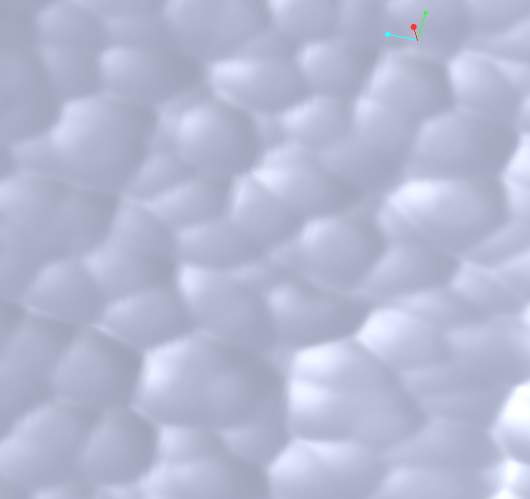
cratered_surface.PNG


This thread is inactive and closed by the PTC Community Management Team. If you would like to provide a reply and re-open this thread, please notify the moderator and reference the thread. You may also use "Start a topic" button to ask a new question. Please be sure to include what version of the PTC product you are using so another community member knowledgeable about your version may be able to assist.

5 replies

23-Emerald IV
July 2, 2015

I'm curious too...

I ran into this once on a baffle inside a muffler.  I believe the surface was created in Catia and it was very, very heavy to work with.  I ended up just copying the surface and merging it with other ones created in Pro/e.

kdirth
21-Topaz I
July 2, 2015

I would agree that the easiest way would be to use the IGES surface to create the surface in a CREO file.  (Use Solidify to cut or create solid)

There is always more to learn.
1-Visitor
July 2, 2015

Thank you for the swift replies. Sadly, it isn't that easy. When I said I had to reproduce the model sent, I was been economical with the true. It not the model I need to copy, but the surface type, i.e. a cratered effect. The model I have to create is a totally different shape to the igs model I have, that was sent for reference only.

What I was hoping for, was to make a plain model, then pick a surface set & apply a deformation in the same way you might apply texture to a surface using the appearance manager.

John

10-Marble
July 5, 2015

Did you try Surface Edit tool inside Style feature? If you have single patch surface - it can provide you high level of details

in editing the surface.

1-Visitor
July 6, 2015

Thanks Michael, unfortunately, I don't have Style feature licence.

John

1-Visitor
July 6, 2015

The program you're looking for is Delcam Powershape

Delcam PowerSHAPE: Adding Textures - YouTube

1-Visitor
July 6, 2015

Thanks for the info. We have PowerShape here. I just showed the video clip to our PowerShape guys, & they almost had a heart attack! I joked that they would have to do the job. Again, just as with Creo, they claim you need some advanced surface licence to do this, which they don't have, or are they BS ing me?

John

1-Visitor
July 6, 2015

The way these software companies like to nickel and dime customers these days, I wouldn't be surprised if it costs extra.

All I know is that it can do what you need. You can always try to request a demo from your sales rep or reseller.

When I saw a demo of this, it didn't look too difficult - just import and wrap it on the surface.

Sounds like you need some motivational exercises in your office. If your Powershape boys are too afraid to do this, maybe you should take them out for some confidence building- hiking, climbing, arm wrestling, a meal involving red meat, hand to hand combat, etc. Not knowing is not a problem. We know that we don't know, no surprise there. Fear is the only darkness

1-Visitor
July 7, 2015

I read his question and understood what he was saying:

"What I was hoping for, was to make a plain model, then pick a surface set & apply a deformation in the same way you might apply texture to a surface using the appearance manager."

He would need to take his IGES and save it as an STL mesh, which would be "wrapped" the texture onto a surface in powershape.

In fact, John already came up with the answer himself. He took his experience with appearances, surfaces, and mapping textures and, through inductive reasoning, deduced that there should be way to map geometry in a similar way.

While the powershape users in his office with their eyes closed are listening to the things they always listen to with eyes open, John is making new mental connections and synthesizing new things and finding grasshoppers that weren't even noticed with eyes open.

Even though he didn't know how to do it, he still knew it could be done. This is an example of taking the entropy of uncertainty and confusion, and repurposing it into something useful. Decision and creation methods like his are how software like Creo is mastered.

The old knock on Creo (Pro/E) is that it's too complicated with too many steps, menu picks, mouse movements, etc. The real problem is that it constantly requires a cycle of:

learning the basics, unstructuring those basics in order to separate what's useful from the noise, establishing a mental map into something productive, and then destroying that mental map while extracting the useful elements

over and over and over. Most people get hung up on one of the first three steps. Only the select few can consistently accomplish the last.

1-Visitor
July 7, 2015

Whoa...my brain hurts after reading that.

An stl would never be able to produce that texture in any useable way. The resolution required would be immense. Also, the file would be so data heavy that the machine trying to deal with it would crap out. To me, that image seems to be the IGES result of a high resolution scan.

What I asked was if Delcam has that canned texture tool in it's tool box that allows that random texture to be added to the mold/die as a CAD/CAM native feature. (I.E. a surface that could be exported back to out). I briefly looked at their site and did not see anything that indicated it could do that. Typically that type of texture is "applied" to the actual physical tooling surface by some means (Chemical etching, bead blasting, etc...)

I am all for learning something new so if Delcam has that I would like to know. I have to specify texture on many of the parts I create.

1-Visitor
July 7, 2015

Look into getting some new hardware. This type of thing is done all the time.

I checked my notes and remembered that we ended up getting this work done with the mold maker. They used these two:

Magics, the Most Powerful STL Editor | Software for additive manufacturing

http://www.geomagic.com/en/products-landing-pages/re-designx-wrap

If you don't like STL then Geomagic will work with STEP or IGES

I can't tell what the scale is on John's image. If it's super fine detail then yes, they're going to use etching or electro-deposition or  Mold Tech textures

14-Alexandrite
July 8, 2015

You may have moved past this issue by now. But I am still curious. How big would one of those craters be? And does it have to be 100% random or can there be some symmetry?

1-Visitor
July 9, 2015

Hi Matt, looking at the model I was sent, I would say the maximum depth of crater was 2mm, & the pattern looks totally random. I spent a little time looking to see if the pattern was repeated & as far as I could see, it is not.

Greg, thanks for your thought provoking replies, I'm not sure our PowerShape guys appreciated them as much as I did ha ha. To answer your query, I would suggest the scale of the image I initially posted, to be approximately 2:1

Regards

John