
21-Topaz II
August 29, 2017
Question

Create a laser cut rip in sheet metal

  • August 29, 2017
  • 3 replies
  • 6130 views

Creo 2, M230


I'm creating a sheetmetal part and I have opening that I want cut with a single laser cut to create a knock out, like this:  
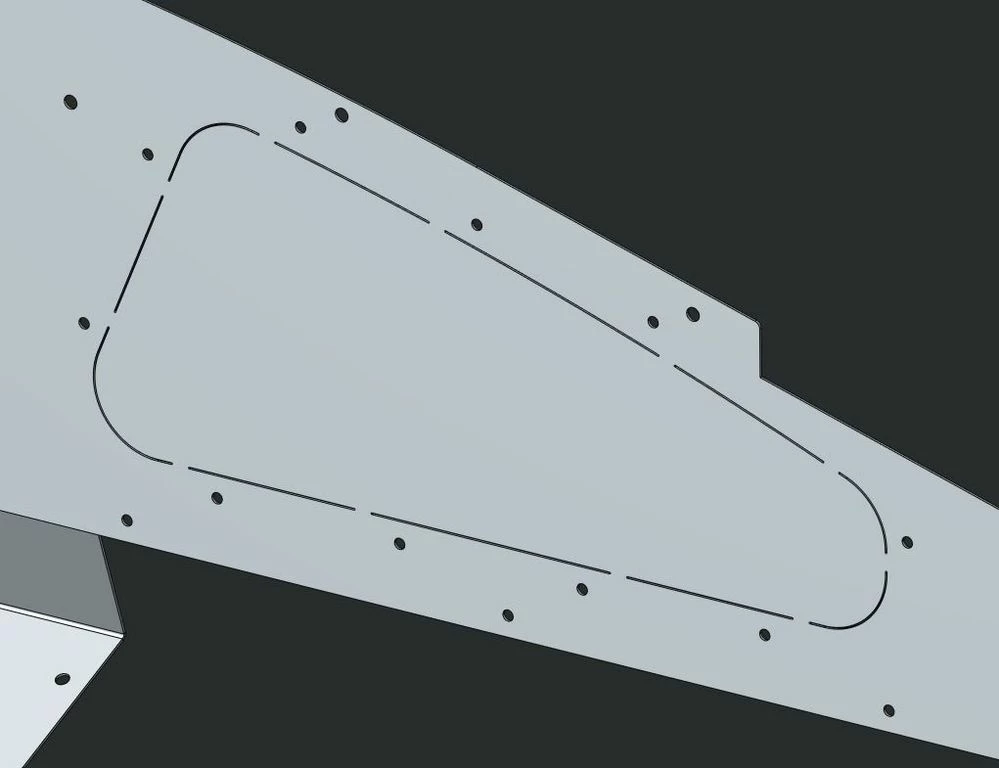
Capture.JPG


I can create a narrow extruded cut (which is how this image was done), but that would mean double the laser time when I only really need a single pass.  


Ho do I create a simple, single laser cut pass like shown?

3 replies

1-Visitor
August 29, 2017

I'd create a single sketch which generates the centerline paths of the knockout cuts and then use it to create the 11 thin extrusions.  That would generate the "hifi 3D model".  Create a simplified rep that does not contain these slits and use this rep as the model for the drawing.  Since the centerline paths would be shown on this drawing and the resulting edges would not be, programming the NC code should be straight-forward by exporting this drawing as DXF...


In fact, I might skip the "true 3D model" step.

21-Topaz II
August 29, 2017

This seems like a reasonable, if cumbersone, approach.


I was hoping for a sheetmetal feature that would enable this without creating 11 features.  I had hoped the "sketched rip" would, but I think it requires the sketch to be tied to a part edge.

1-Visitor
August 29, 2017

Yeah, quite cumbersome; copy+paste special is a must here.

This is a sketch scheme I think I'd use for keeping those gaps under control:

manual_dash.png

21-Topaz II
August 29, 2017

I believe so, which is why I wanted to avoid the two lines of a thin cut.

HamsterNL
18-Opal
August 30, 2017

Have you tried using a Cosmetic Sketch?

(and give the cosmetic sketch a color which your laser recognizes as a cut-line.)

HamsterNL
18-Opal
September 13, 2017

@dgschaefer did you find a solution for your problem/challenge?

21-Topaz II
September 13, 2017
@HamsterNL wrote:

@dgschaefer did you find a solution for your problem/challenge?


I did, I guess.  I carried on making a narrow sectioned extruded solid cut (section width of 0.002") and placed a note on the drawing that they should be cut with a single laser pass.  Not ideal, but it works as would have the other suggestions here.  @psobejko's solution is close to what I did, but not quite because I used a single solid extrusion vs. the multiple thin extrusions.  The single feature seemed easier to implement and control.