

1-Visitor
March 21, 2013
Solved

Create part name in a note

  • March 21, 2013
  • 5 replies
  • 8663 views

How can I get the part name in a note? I have tried &model_name, but then the name of the assembly is displayed.
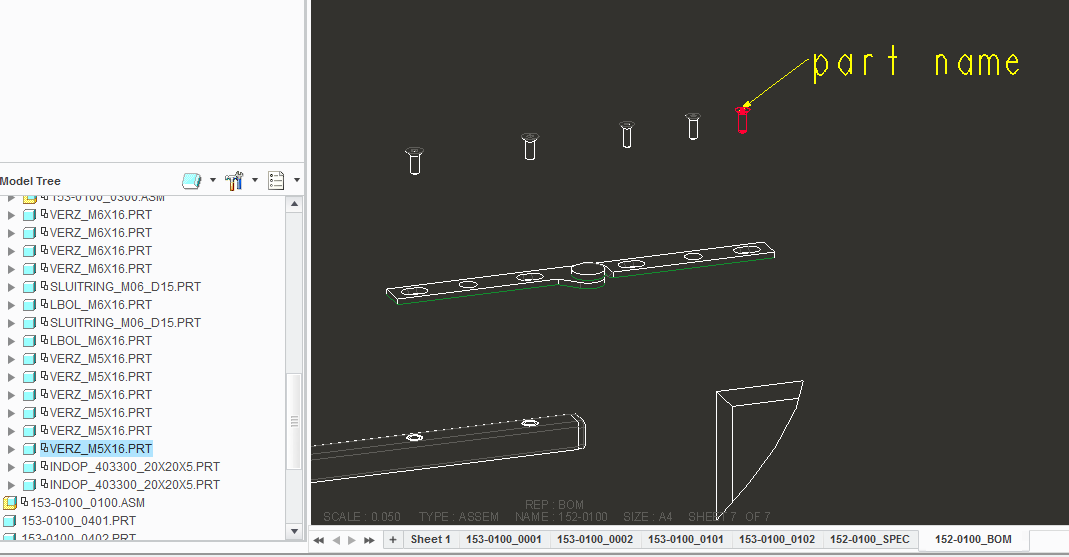
Knipsel.PNG


This thread is inactive and closed by the PTC Community Management Team. If you would like to provide a reply and re-open this thread, please notify the moderator and reference the thread. You may also use "Start a topic" button to ask a new question. Please be sure to include what version of the PTC product you are using so another community member knowledgeable about your version may be able to assist.
Best answer by dgschaefer

Another way to do this is to find the part's session id.

Open the relations dialog (Tools tab > relations) and then pick Show > Session ID, pick Park in the pop up menu and then pick the part in question on screen. The session ID will be shown in the message area. Then create a note with this text '&model_name:ID where ID is the number you just found.

Another method would be to create a user parameter in your part tied to the file name. Enter the relation file_name = rel_model_name in the part's relation and then use &file_name:att in your note attached to the model.

5 replies

21-Topaz II
March 21, 2013

If your note is attached to the edge of the model in question (and not an edge created by a section, for example), you shoudl be abel to use &model_name:att).

Dale_Rosema
23-Emerald III
23-Emerald III
March 21, 2013

Doug,

Is the ":att" the number of the model in the assembly? How do you find that number?

Thanks, Dale

21-Topaz II
March 21, 2013

Another way to do this is to find the part's session id.

Open the relations dialog (Tools tab > relations) and then pick Show > Session ID, pick Park in the pop up menu and then pick the part in question on screen. The session ID will be shown in the message area. Then create a note with this text '&model_name:ID where ID is the number you just found.

Another method would be to create a user parameter in your part tied to the file name. Enter the relation file_name = rel_model_name in the part's relation and then use &file_name:att in your note attached to the model.

sloman1-VisitorAuthor
1-Visitor
March 21, 2013

Doug!

It works, thank you!

Knipsel.PNG

Dale_Rosema
23-Emerald III
23-Emerald III
March 21, 2013

What method did you use - the ID?

14-Alexandrite
March 21, 2013

Hi,

...if I need to check the corect information "att_mdl" for note in drawing - I create "fake relation" in assembly mode - system automatically create for me information (behind parameter in relation) and then I can use this number to my note in drawing

For example:

note.JPG

sloman1-VisitorAuthor
1-Visitor
March 21, 2013

Now I have made a "mapkey" to search for the session ID. In the mapkey is also the command for making the note. It takes seconds to place the part numbers in a assembly.

14-Alexandrite
March 21, 2013

I like mapkeys too -

Here is some Trisks with Mapkeys and video Hide custom Layers with Mapkeys

14-Alexandrite
March 22, 2013

I have created idea for new release

What do you think? Vote here: Enable Show/Hide Session ID in Model Tree

1-Visitor
February 2, 2015

For some reason I have found that I have to enter the parameter in lowercase &model_name and uppercase &MODEL_NAME does not work. For multi-part drawings, whatever model I have active, ProE / Creo will append the correct number at the end e.g. &model_name:12