

kdirth
21-Topaz I
21-Topaz I
September 7, 2022
Question

Create smooth variable draft across multiple surfaces

  • September 7, 2022
  • 3 replies
  • 3522 views

Is there an easy way to create a smooth variable draft when there are several surfaces of varying length?


Here is a simplified example of the issue:
kdirth_0-1662577419202.png

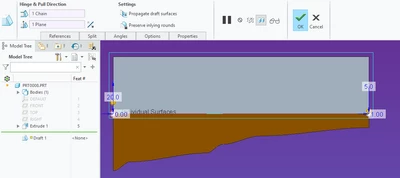
The drafted surface is made from several segments of different length and the draft hinge is the edge of those segments.  It appears that Creo is splitting the change in draft angle evenly over each segment rather than over the length.


Is this what the draft feature is expected to do?  I was expecting it to smoothly make the variation over the full distance.


Creo 7.0.8.0

3 replies

tbraxton
22-Sapphire II
22-Sapphire II
September 7, 2022

Can you clarify which draft feature creation method you are inquiring about? I assume it is the first in this list but would like to confirm.


tbraxton_0-1662581452894.png


kdirth
21-Topaz I
kdirth21-Topaz IAuthor
21-Topaz I
September 7, 2022

It is the first option (Draft).

There is always more to learn.
tbraxton
22-Sapphire II
22-Sapphire II
September 7, 2022

This is a quilt comprised of 4 surfaces generated from this sketch. A variable draft is applied using the sketch entities as the draft hinge. If by smooth you mean C1 continuity across the patch boundaries it is possible in some cases. Creo 7 model enclosed for reference.


Are the segments used as the draft hinge tangent to each other at the end points? I may be missing something about how you are creating the geometry, can you post the model?


tbraxton_0-1662585000580.png


tbraxton_1-1662585016766.png


tbraxton_2-1662585159858.png


kdirth
21-Topaz I
kdirth21-Topaz IAuthor
21-Topaz I
September 8, 2022

All of the surfaces are tangent.  Attached is a Creo 7 example of what I am getting.  The issue is seen in the short wall segment.  Everything is still tangent, but the change in draft over that 5% of the wall appears to be about 20% of the change.

kdirth_0-1662641237429.png

I have been able to get a better outcome by measuring the length of each wall and calculating the expected draft and adding a draft value at each intersection accordingly.

There is always more to learn.
tbraxton
22-Sapphire II
22-Sapphire II
September 8, 2022

 If you need explicit control of the angle as a function of path length I think that is possible with relations. You would need to inquire exactly the algorithm used to interpolate between the defined angle control points in the feature. They may use linear interpolation but I am not sure.


tbraxton_2-1662643882332.png


tbraxton_3-1662643899059.png


kdirth
21-Topaz I
kdirth21-Topaz IAuthor
21-Topaz I
September 14, 2022

To wrap this up, because of the way Creo creates a variable draft, as shown by the analysis in the response from @tbraxton, a smooth/straight transition between varying angles is not possible with the draft feature.  Creo creates a "flat" in the angle variation of the draft at each defined draft angle.  Even a flat square wall will not create an even angular transition between 2 angles.

There is always more to learn.