
1-Visitor
May 15, 2014
Solved

Creating a datum axis across an angle

  • May 15, 2014
  • 2 replies
  • 3792 views

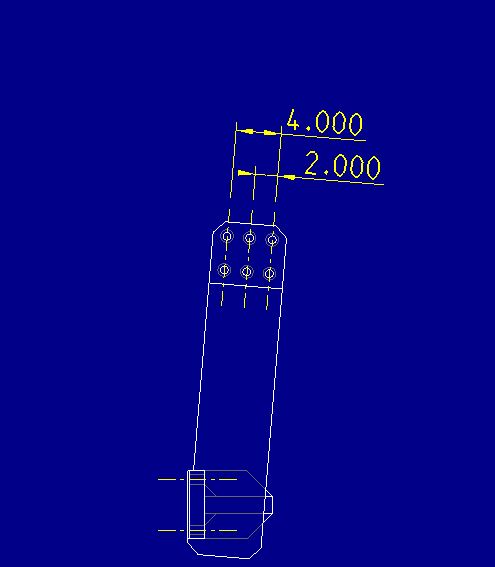
I am trying to create two datum axes for a hole pattern. The default annotations for Creo do not put the axis at the 4 degree angle of the model I created. I was able to create the vertical axes with no issues, but cannot figure out how to create the horizontal axes since you don't have the option to select the center of the hole. See below.
Datum_Axis_horizontal_creation.JPG


This thread is inactive and closed by the PTC Community Management Team. If you would like to provide a reply and re-open this thread, please notify the moderator and reference the thread. You may also use "Start a topic" button to ask a new question. Please be sure to include what version of the PTC product you are using so another community member knowledgeable about your version may be able to assist.
Best answer by dschenken

One assumption - that the holes are normal to the screen. If that is true you can show the axes for the holes. They will come in vert/horz. To change them from being horz/vert, select an axis and then RMB and you should see a new menu item for allowing rotation - Edit Attachment. Pick that and a new, previously secret menu shows up.

2 replies

17-Peridot
May 15, 2014

If you show the axis in the holes, you can change their angle to get the typical centerline crosshairs for holes.

dschenken1-VisitorAnswer
1-Visitor
May 15, 2014

One assumption - that the holes are normal to the screen. If that is true you can show the axes for the holes. They will come in vert/horz. To change them from being horz/vert, select an axis and then RMB and you should see a new menu item for allowing rotation - Edit Attachment. Pick that and a new, previously secret menu shows up.

1-Visitor
May 15, 2014

Thanks David, that worked very well. One last thing, how can I add another 4 degree dimension on the upper right hole off of the 26.500" vertical dimension. I was able to do this on the 7.000" dimension because I could make a line within the new reference dimesion function by selecting a vertex, but the vertices are only at the 90 and 180 degree spots on the hole.

Creating_a_dimension_at_4_degree_angle.JPG