
1-Visitor
November 8, 2024
Question

Creo 10 Student Version - Can't start Creo because of Quality Agent

  • November 8, 2024
  • 3 replies
  • 834 views

Hi, 

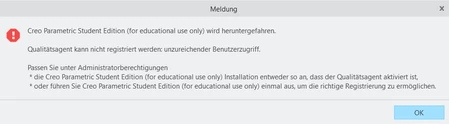
Creo keeps shutting down because of this error. I have the student version and it basically says that it doesn't have "enough" access but I have already allowed it to communicate through my firewall. Plus, I uninstalled and reinstalled the diagnostic tool and it still won't work. I'll be really grateful ofr any suggestions on how to fix it. Thanks!

Error message ↓
DZ_12314963_0-1731093419166.png


3 replies

23-Emerald III
November 8, 2024
1-Visitor
November 8, 2024

Thanks for the reply! Sadly I have no clue what is and how to set an environment variable and can't find the creoagent.exe file. I looked for it in the installation directory but didn't find it. Do you have suggestions on where to start? Thanks again : ) 

24-Ruby III
November 11, 2024

Hi,

try following (paths are related to Creo 11.0):

  • uninstall PTC Diagnostic Tools
  • uninstall PTC Creo ? Platform Services
  • install PTC Diagnostic Tools
    • <CR11_installation_package>\install\addon\qualityagent_64.msi
  • install PTC Creo ? Platform Services
    • <CR11_installation_package>\install\addon\creosvcs_64.exe
  • in both cases use Options button (I am not sure about the button name)
    and enter path to Creo installation ... I guess it is C:\Program Files\PTC


What Creo version are you installing?

The above procedure assumes that only one Creo version is installed.

joe_morton
18-Opal
18-Opal
January 10, 2025

Have you tried fully uninstalling and reinstalling Creo?