
1-Visitor
August 20, 2013
Question

Creo 2.0 - Attaching to Dimensions (Geo. Tol., notes, etc.)

  • August 20, 2013
  • 2 replies
  • 8886 views

I'm having trouble figuring out how to relate feature control frames and notes to dimensions as in the screen shot below. I was wondering if someone knew how the guy before me did it. The feature control frame is placed as a free note, but is somehow related to the dimension. The dimension allows room for it, and moves with it.
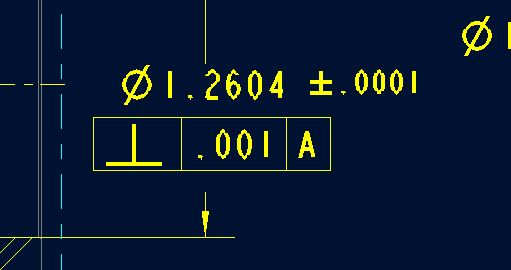
 

Capture.JPG


Thanks in advance,


Matt


This thread is inactive and closed by the PTC Community Management Team. If you would like to provide a reply and re-open this thread, please notify the moderator and reference the thread. You may also use "Start a topic" button to ask a new question. Please be sure to include what version of the PTC product you are using so another community member knowledgeable about your version may be able to assist.

2 replies

Dale_Rosema
23-Emerald III
23-Emerald III
August 20, 2013

Check Antonius answer in this thread and see if this is how it was done.

http://communities.ptc.com/message/211788#211788

Thanks, Dale

If your in the annotate tab, right click on the dimension and them go to dsiplay.

You may see @[perp symbol]@[.0001@]@[A@]

17-Peridot
August 20, 2013

It is appended text to the dimension, Matt. In the last tab of the dimension properties dialog is a multiline text editor. Open the Symbol pallete to select symbols. Each box entry needs to be delimited with @[ and @].

msteis1-VisitorAuthor
1-Visitor
August 20, 2013

These are all separate features. The dimension is it's own feature driven from the model. The +/-.0001 is a note, the feature control frame is it's own feature also. Editing it brings up the geo. tol. properties box. Thanks though.

Matt

17-Peridot
August 21, 2013

It is always hard to know what you are looking at when you see it on a drawing.

The .0001 tolerance really should have been a tolerance as part of the dimension. If you don't know to change the detail config to show tolerances, people tend to just type it in.

The feature control block can be "attached" to the dimension through the GTOL dialog. But again, you have to know how to properly define the datums and the GTOL features in the model (or as drawing features) to attach them to the dimension.