
1-Visitor
August 28, 2013
Question

Creo 2.0 display flipped vertically

  • August 28, 2013
  • 3 replies
  • 1442 views

OK, I have a fun one... Fresh install of Creo 2.0 on Windows 7 Pro and the working area is flipped vertically (this means pointer selection, dimensions, and labels are all upside down). All icons and anything else outside the working area is fine...

Any thoughts?

And to avoid the obvious, this looks the same in any view.

Much appreciated for any suggestions!
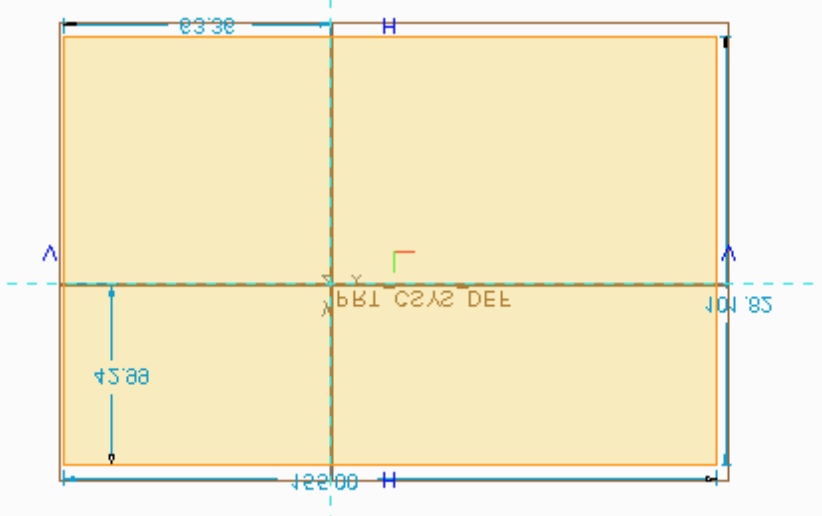
Screen+Shot+2013-08-27+at+7.17.14+PM.png

    3 replies

    2-Explorer
    August 30, 2013

    I found one similar issue (flipped graphics in sketcher) in our database, reported about a year ago against Creo Elements/Pro 5.0 by a Chinese customer.

    However, it was never reproduced and the issue was gone at the customer site at some point with no more infos coming from the customer.

    It was suspected to be a driver/hardware issue, probably related to dual monitor systems.

    The infos we had got from them at that time:

    - Restored New OS Windows 7 Pro X64 , at hp Z800 with 12Gb RAM & SAS 500GB drive.
    - Graphic Card Nvidia Quadro 4000 has replaced another unit
    - Graphic Driver software has been updated to ver276.42

    Three of eight machines with dual monitor have this issue, Randomly occurs in case when opening several files

    Maybe you can find some common ground, when comparing notes.

    Gunter

    24-Ruby III
    September 2, 2013

    Michael,

    put flipped into search field and you will get link to my previous answer

    http://communities.ptc.com/message/191374#191374

    Martin Hanak

    Patriot_1776
    22-Sapphire II
    September 3, 2013

    Easy fix: Turn your monitor upside-down!