
12-Amethyst
October 28, 2015
Question

Creo 3 - Append option, where is it?

  • October 28, 2015
  • 1 reply
  • 1605 views

In Creo 2.0 when we drag/drop a iges or step file into Creo active window, there was a option to append the geometry.
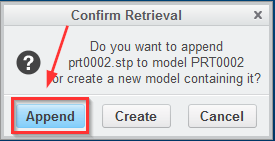
 

append.png


Now in Creo 3 this option has gone...

Any config option to bring it back? We make heavy use of this option...


Jose


This thread is inactive and closed by the PTC Community Management Team. If you would like to provide a reply and re-open this thread, please notify the moderator and reference the thread. You may also use "Start a topic" button to ask a new question. Please be sure to include what version of the PTC product you are using so another community member knowledgeable about your version may be able to assist.

1 reply

23-Emerald IV
October 28, 2015

Use the Get Data / Import function.

12-Amethyst
October 28, 2015

That's what i'm afraid. That option existed in the previous versions but we never used it.

We have to append step and iges files, from our suppliers and customers, to check differences all the time, and it's much more faster to drop the received file in the creo  window and choose append option than have to go browsing through windows folders looking  for the right path of the file and leaving space for human error.


This is just a detail in the program, but for us a great step backward in productivity. Hope that someone from PTC has a better turnaround for this.


Jose