8-Gravel
June 6, 2019
Question

CREO 4 CREATE DIMENSION AND SYMMETRICAL CONSTRAINT AT SAME TIME

  • June 6, 2019
  • 2 replies
  • 4031 views

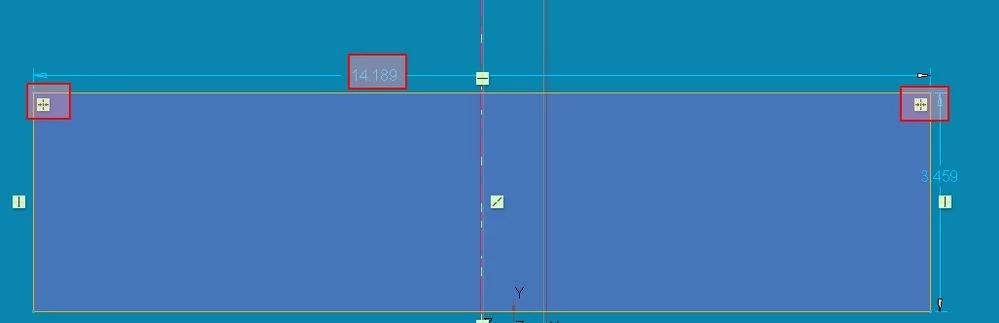
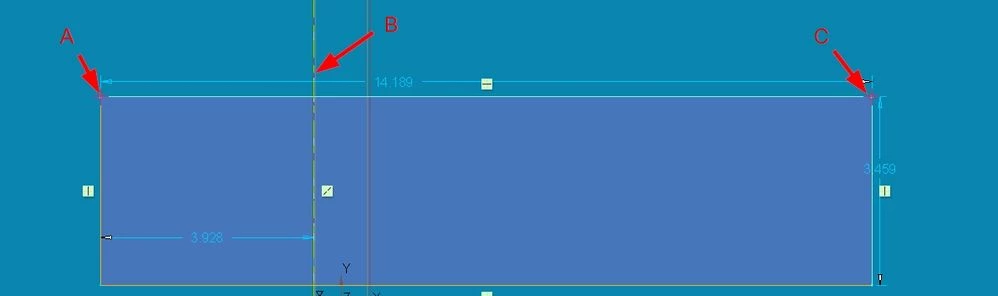
In past versions of PROE and CREO while adding dimensions in a sketch I've been able to create the symmetrical constraint and the symmetrical dimension at the same time.  I'd select point A, centerline B, then point C (see first screenshot) and the result would be points A and B being symmetrical about centerline B (with constraints and a dimension... see second screenshot).  Did PTC do away with this functionality or is it controlled by a config setting?  


This IS NOT the same as symmetrical dimensioning for a revolve (IE. Selecting point A, centerline B and then point A again).


Any suggestions on what may have happened would be greatly appreciated thanks!
 

Creo Parametric.jpg

Creo Parametric2.jpg


2 replies

24-Ruby III
June 7, 2019

Hi,

in Sketcher click symm.png button. Then select centerline and two verticies.

MarcHaren8-GravelAuthor
8-Gravel
June 7, 2019

@MartinHanak I know I can make them symmetrical with that button but there use to be a way that while in the dimension tool I could click a vertex, click the centerline, then click a vertex on the opposite side of the centerline and it would make the two vertices symmetrical with the dimension.  What you're suggesting works but it's an extra step.  Thank you for your reply though.

KenFarley
21-Topaz II
June 7, 2019

I don't remember this type of thing, and I've been using the various versions of this software since 1994. I do see that if I create a quick sketch as you show it does put in a weak dimension. Creo's intent manager doesn't ever seem to create any strong dimensions "by default" for any geometry.

MarcHaren8-GravelAuthor
8-Gravel
June 7, 2019

@KenFarley I used this method a lot in CREO 2 with another company.  It was a fast way to create the dimension and constraint at the same time.  Now with my new company and CREO 4 I can't seem to get it to work.  I didn't know if it was something PTC removed with their newer versions of CREO.

24-Ruby III
June 7, 2019

@MarcHaren wrote:

@KenFarley I used this method a lot in CREO 2 with another company.  It was a fast way to create the dimension and constraint at the same time.  Now with my new company and CREO 4 I can't seem to get it to work.  I didn't know if it was something PTC removed with their newer versions of CREO.


Hi,

I did my test in Creon 2.0. Your A,B,C procedure does not work. What shall I do when I have A, B, C selected ?