
1-Visitor
March 7, 2018
Solved

Creo 4 not Showing Diameter designation for creating different sized holes.

  • March 7, 2018
  • 2 replies
  • 6132 views

Hello,

When using sketcher and sketching multiple holes of different sizes in earlier version you would get a designator that would let you see what hole you would snap to make the same size hole you wanted. Does anyone know how to turn this on in Creo 4??


Attached are 2 pictures of what i'm trying to covey, 1 picture from Creo 4 which shows just and equals sign but now way to differentiate between which hole would be snapped to.


The other picture shows how it is in Creo 3, easy to see which hole you are snapping to.
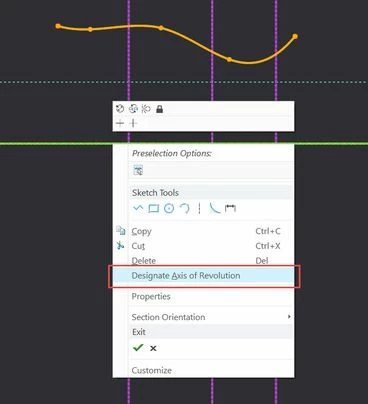
 

Best answer by mcestnik

Select the axis - right mouse button and press "Designate axis of revolution".2018-03-07_15-26-58.jpg

2 replies

16-Pearl
March 7, 2018

you must have the axis in your sketch, must be the 1st one. Can you share your section?

dimitrios1-VisitorAuthor
1-Visitor
March 7, 2018

I want to revolve it around the horizontal axis ( the one which does not intercept the sketch) but when I select revolve feature , I get what you see in the second image wihtout being able to choose anything else exept a new sketch in a revolve tab

in thw sketch tabin thw sketch tabrevolve settingsrevolve settings


Mahesh_Sharma
22-Sapphire I
March 7, 2018

As per images, there is no possible axis for revolve hence getting stuck. If you will create an axis prior profile Sketch, it will allow revolve.

Patriot_1776
22-Sapphire II
March 7, 2018

There are 2 ways to do it:

1.  Create a centerline in your sketch, and set it as the Axis of Revolution (highlight then Right mouse button).

2.  Have a datum axis created prior to your sketch, and use that.  Also, ALL entities must be on one side of the Axis.

17-Peridot
March 7, 2018

...and remember that there are geometry axes and construction axes.

If you can, use one geometry axis for the true axis of rotation within the sketch and any required subsequent axes should be construction axes.

Patriot_1776
22-Sapphire II
March 7, 2018

Does it really matter?  I tend to create construction axiis (because that's my mapkey), then just designate them as the Axis of revolution.  It created an axis within the part either way.  I mean, in sketcher it gives me a pop-up that says:  "It is best practice to use a Geometry Centerline......for an Axis of Revolution.  This Construction Centerline will be converted to a Geometry Centerline."  I checked it and it WILL convert it for you,,,,,,but you can get back out of the feature and manually change it to a Construction Centerline and it doesn't change the part as far as I can see, the created feature axis stays there.