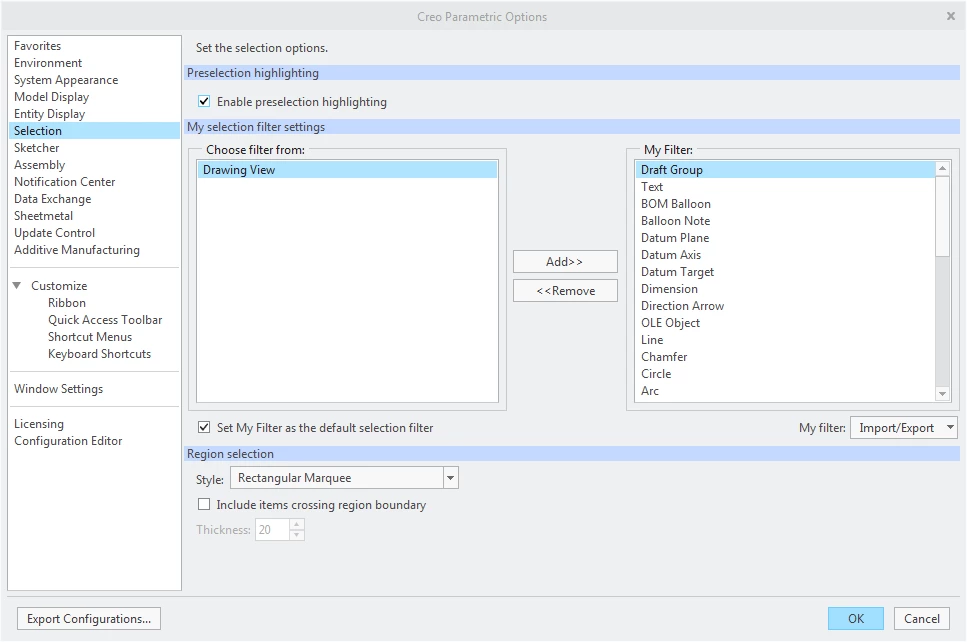
Creo 4 - Use My Filter to Disable Drawing View Selection
One of my big peeves with Creo drawings is that no matter what tab is active, the Drawing View is a possible selection. We have giant view envelops because of our master models and you can easily be zoomed in on a view, select empty background area and without knowing it, you’ve actually selected the view. Why on earth anyone would want to or expect to select a view when you're in the Annotate tab? Anyway, the good news is that I think I have a good fix in Creo 4.
Using File> Options> Selection, you can create your own selection filter (and set it as default), it is called "My Filter". To fix this issue, I customized My Filter by removing Drawing View from the allowable selections. So far, it seems to work really well.
Give it a try and comment if you find any downsides.