
1-Visitor
February 4, 2021
Solved

Creo 7 MBD - how to annotate the Pitch Circle Dimension

  • February 4, 2021
  • 3 replies
  • 7873 views

Dear All,


I am converting a 2D drawing from a part of an existing product into a MBD dataset. To do so, I would like my MBD dataset to fully encompass all the annotations found in the 2D drawing (as they are the critical dimensions of the part), however, on the 2D drawing a Pitch Circle Dimension (PCD) of a hole pattern has been specified. I tried to annotate this through selecting 'Show dimensions' on the holes that lay on the pitch circle, but this did not work. Furthermore I tried 'Dimension' from the annotations tab but this also seemed to not be able to show the PCD. On both PTC (community) website and Google I could not find any answer on how to do this correctly, so therefore I am posting here.


My question is: How can I (3D) annotate the Pitch Circle Dimension?


I did find a small work around, to use 'dimension' between two holes of the dimension. This sort of gives the dimension of the PCD, but the two holes are not parallel to the x-axis of the annotation plane. Skewing solves this and makes it parallel but then the leader lines are not equal length, resulting in the dimension text being angled compared to the x-axis of the annotation plane. Furthermore I doubt if this gives correct data that can be used downstream.


Thanks in advance,


Seth
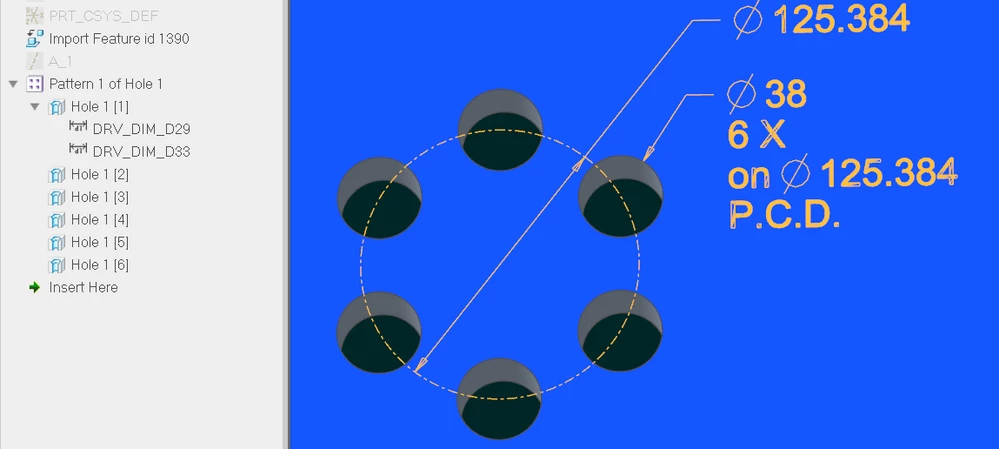
Best answer by pausob

MBD combined state: showing feature and part dimensions (Creo 4):

radial_pattern_pcd.png

Note: patterned hole defined using "radial" (or "diameter") placement.


3 replies

24-Ruby III
February 4, 2021

@Seth wrote:

Dear All,


I am converting a 2D drawing from a part of an existing product into a MBD dataset. To do so, I would like my MBD dataset to fully encompass all the annotations found in the 2D drawing (as they are the critical dimensions of the part), however, on the 2D drawing a Pitch Circle Dimension (PCD) of a hole pattern has been specified. I tried to annotate this through selecting 'Show dimensions' on the holes that lay on the pitch circle, but this did not work. Furthermore I tried 'Dimension' from the annotations tab but this also seemed to not be able to show the PCD. On both PTC (community) website and Google I could not find any answer on how to do this correctly, so therefore I am posting here.


My question is: How can I (3D) annotate the Pitch Circle Dimension?


I did find a small work around, to use 'dimension' between two holes of the dimension. This sort of gives the dimension of the PCD, but the two holes are not parallel to the x-axis of the annotation plane. Skewing solves this and makes it parallel but then the leader lines are not equal length, resulting in the dimension text being angled compared to the x-axis of the annotation plane. Furthermore I doubt if this gives correct data that can be used downstream.


Thanks in advance,


Seth


Hi,

I guess you have to create additional Sketch feature containing circle.

tbraxton
22-Sapphire II
22-Sapphire II
February 4, 2021

This may be related to how the holes were created in the model. If you post the part or a simplified model with the holes created exactly (copy/paste from one model to another) as in your model that will allow for investigation.


If you used a pattern for the holes what is the dimensioning scheme for the pattern lead? Does the lead hole include a  diameter dimension?

pausob19-TanzaniteAnswer
19-Tanzanite
February 4, 2021

MBD combined state: showing feature and part dimensions (Creo 4):

radial_pattern_pcd.png

Note: patterned hole defined using "radial" (or "diameter") placement.


Seth1-VisitorAuthor
1-Visitor
March 17, 2021

Hi, I wanted to thank you (and the rest) for the helping. This ended up working. The only thing I can not get to show yet is the circle itself (the -. circle in your picture).

19-Tanzanite
March 17, 2021

Not sure why the PCD circle display doesn't work for you.  In Annotate mode, I select the patterned holes, right click and "Show annotations"

There used to be a setting called radial_pattern_axis_circle and it has to be set to YES for the circle to show up, but I don't see it in Creo 4 anymore.